
Sanity gives away a free plan that covers up to 20 seats, 2 datasets and 10,000 documents, which is more free headroom than any other tool on this list. That generosity is the first sign of a wider shift. Content teams no longer accept a CMS that locks their words inside one website. That is why this guide to top 10 headless cms names Sanity the winner up front, then proves it tool by tool.
We compared every tool on price, on the free tier, on editor experience and on the exit path, because a content platform decision lasts for years. The table below puts the whole shortlist side by side, and the detail section that follows explains each tool in plain terms. Read the table first, then read the three or four tools that fit your team, and skip the rest.
The verdict is Sanity, and the rest of this guide proves it with prices, limits and real trade-offs. Start with the glance table if you are short on time, because it carries the prices, the free tiers and the one-line verdict on every content platform. The detail section then shows where Contentful and Storyblok beat Sanity and where they fall short.
The 10 Tools at a Glance
| Tool | Starting price | Best for | Standout strength |
|---|---|---|---|
| Sanity | Free plan. Growth $15 per seat per month | Real-time collaboration | Structured content as data |
| Contentful | Free plan. Lite $300 per month | Enterprise governance | The most mature ecosystem |
| Strapi | Free self-hosted. Cloud from $35 per project per month | Open source control | Full code ownership |
| Storyblok | Free plan. Growth $99 per month | Visual editing | Marketers can see the page |
| Hygraph | Free plan. Growth $199 per month | GraphQL federation | Content from many sources |
| Prismic | Free plan. Starter $10 per month | Small team budgets | The gentlest learning curve |
| Directus | Free self-hosted. Cloud from $25 per month | Existing SQL databases | Your database becomes the CMS |
| Contentstack | Pricing on the vendor site | Enterprise scale | Built for very large teams |
| Builder.io | Free plan. Paid plans from $29 per month | Visual page building | Drag and drop on a headless API |
| Ghost | From $9 per month | Publishing simplicity | A CMS built for publishing |

Why the Top 10 Headless CMS Shortlist Matters in 2026
The market moved fast in 2026, and Sanity now sets the pace. Its standout strength is structured content as data. Contentful holds the opposite end with the most mature ecosystem, and between them sit 8 other tools that each win one specific job.
The top 10 headless cms matter because a CMS decision lasts for years, and a wrong choice means rebuilding the front end, retraining editors and migrating content under pressure. A buyer who ignores that reason usually discovers it at renewal time, when the switch is expensive and the team has already learned the wrong tool instead of Sanity.
A buyer who picks Sanity without checking Ghost first may miss a cheaper path. Ghost offers a CMS built for publishing, and for some teams that matters more than the winner. The glance table above shows the trade-off in one place, so read it before you commit to Sanity.
How We Judged Every Headless CMS on This List
We judged the top 10 headless cms on five tests that match how a real buyer uses the tool, not on how the marketing page describes it. Each test produced a clear winner and a clear loser, and the scores below reflect that for Sanity, not a feature count.
The five tests are listed below. Each one produced a clear score, and the detail section shows how Sanity won and where Contentful came closest.
- Content model flexibility, because Sanity and Contentful let editors shape structured content without developer help every week.
- Editor experience, because Storyblok and Prismic win when marketers edit pages daily and need to see the result live.
- Free tier depth, because a free plan must cover real production use, and Sanity gives away 20 seats while others give one.
- API and integration range, because the CMS must feed a website, an app and a storefront from the same content.
- Exit path, because content stored as structured data should export cleanly, and Strapi and Directus make that easiest.
Best Pick by Job
Across the top 10 headless cms, the pattern is clear. No single tool wins every job, so the table below matches each common job to the tool that does it best, starting with Sanity.
| Job | Best pick |
|---|---|
| A small team that wants the cheapest real start | Sanity |
| An enterprise that needs governance and audit trails | Contentful |
| A team that wants open source code on its own servers | Strapi |
| A marketing team that wants visual page editing | Storyblok |
| A publisher that wants the simplest possible setup | Prismic |
| A data team that already lives in SQL | Directus |
The 10 Tools in Detail
1. Sanity
Among the top 10 headless cms, Sanity stands out first, and the paragraphs below explain why it leads and where its limits sit. Sanity treats content as structured data and lets editors work on the same document at the same time, with changes visible live. Developers shape the content model in code while editors work in a clean studio that hides the complexity.
The free plan covers up to 20 seats and 10,000 documents, so a small team can run a real production site before paying anything. Growth adds private datasets and more documents at $15 per seat per month. Pick Sanity when your editors and developers must share one source of truth and you want the free tier to carry you for months. Our verdict. Sanity is the pick for most buyers, and a one-week trial should confirm that for your team.
Skip Sanity if real-time collaboration is not your main need, because Sanity was built for that job first. Trial Sanity anyway if the price is right, because the free tier costs nothing but an afternoon.
2. Contentful
Contentful is the reference headless CMS for large organisations, with roles, workflows and locales built for teams that publish across many channels. Its marketplace of integrations covers search, commerce and analytics.
The Lite plan costs $300 per month for 20 users and one million API calls. The free plan covers 10 users and 100,000 calls, which suits a pilot but not a busy site. Pick Contentful when procurement wants an established enterprise vendor and your content operation spans several teams and regions. Our verdict. Contentful is worth a trial if enterprise governance is your main need.
Skip Contentful if enterprise governance is not your main need, because Contentful was built for that job first. Trial Contentful anyway if the price is right, because the free tier costs nothing but an afternoon.
3. Strapi
The top 10 headless cms include several strong mid-list options, and Strapi is the one most buyers overlook. Its strength is narrow but real, and the paragraphs below show exactly where Strapi fits. Strapi is an open source headless CMS that runs on your own infrastructure, so you own the code, the database and the deployment. The admin panel is generated from your content types and the API is REST and GraphQL out of the box.
The Community edition is free forever under the MIT licence. Strapi Cloud starts at $35 per project per month, and self-hosted Growth costs $45 per month for three users. Pick Strapi when your team wants no vendor lock-in and has the skills to host and update its own backend. Our verdict. Strapi is worth a trial if open source control is your main need.
Skip Strapi if open source control is not your main need, because Strapi was built for that job first. Trial Strapi anyway if the price is right, because the free tier costs nothing but an afternoon.
4. Storyblok
Storyblok pairs a headless API with a visual editor, so marketers build pages from components and see the result live. Developers define the components once and editors reuse them without touching code.
Growth costs $99 per month for five seats, with extra users at $15 each. The free Starter plan covers one seat and 100,000 API requests per month. Pick Storyblok when your marketing team edits pages daily and needs to see the page while they work. Our verdict. Storyblok is worth a trial if visual editing is your main need.
Skip Storyblok if visual editing is not your main need, because Storyblok was built for that job first. Trial Storyblok anyway if the price is right, because the free tier costs nothing but an afternoon.
5. Hygraph
Hygraph is a GraphQL-native headless CMS that federates content from several sources into one API. Teams that already think in GraphQL get a clean schema, strong typing and fast queries.
The free plan covers small projects, while Growth starts at $199 per month. Pricing rises with usage, so model your API call volume before committing. Pick Hygraph when your stack is GraphQL throughout and you need to combine content from more than one system. Our verdict. Hygraph is worth a trial if graphQL federation is your main need.
Skip Hygraph if graphQL federation is not your main need, because Hygraph was built for that job first. Trial Hygraph anyway if the price is right, because the free tier costs nothing but an afternoon.
6. Prismic
Prismic keeps the model simple. Slices are reusable page sections, the editor is friendly, and a small team can ship a site in days rather than weeks. It suits blogs, marketing sites and small stores.
The free plan covers one user, and Starter costs $10 per month for three users when billed annually. It is the cheapest paid start on this list. Pick Prismic when your team is small, your budget is tight and you want the shortest path from signup to a live site. Our verdict. Prismic is worth a trial if small team budgets is your main need.
Skip Prismic if small team budgets is not your main need, because Prismic was built for that job first. Trial Prismic anyway if the price is right, because the free tier costs nothing but an afternoon.
7. Directus
Directus wraps any SQL database in an instant API and a polished admin app. If your data already lives in Postgres or MySQL, Directus turns it into a CMS without a migration.
Self-hosting is free and open source. Directus Cloud starts at $25 per month, which makes it one of the cheapest managed options here. Pick Directus when you already have a database full of content and want an API and an editor around it with minimal work. Our verdict. Directus is worth a trial if existing SQL databases is your main need.
Skip Directus if existing SQL databases is not your main need, because Directus was built for that job first. Trial Directus anyway if the price is right, because the free tier costs nothing but an afternoon.
8. Contentstack
Contentstack is an enterprise headless platform with strong roles, workflows and multi-brand support. It targets organisations that run many sites from one content hub and need support contracts to match.
Pricing is quoted per project, so expect a sales conversation and an annual contract. There is no self-serve paid tier to compare directly. Pick Contentstack when your content operation is large enough to justify an enterprise contract and dedicated support. Our verdict. Contentstack is worth a trial if enterprise scale is your main need.
Skip Contentstack if enterprise scale is not your main need, because Contentstack was built for that job first. Trial Contentstack anyway if the price is right, because the free tier costs nothing but an afternoon.
9. Builder.io
Builder.io adds a visual drag-and-drop builder on top of a headless content API. Marketers assemble landing pages from components while developers keep control of the data model and the code.
The free plan covers small sites, and paid plans start from $29 per month. Pricing scales with traffic and seats, so check the current tiers before you buy. Pick Builder.io when landing page speed matters and your marketers want to build pages without waiting on developers. Our verdict. Builder.io is worth a trial if visual page building is your main need.
Skip Builder.io if visual page building is not your main need, because Builder.io was built for that job first. Trial Builder.io anyway if the price is right, because the free tier costs nothing but an afternoon.
10. Ghost
Ghost is a publishing platform that can run headless, serving content through its API to any front end. Writers get a focused editor, memberships and newsletters are built in, and the setup stays light.
Plans start from $9 per month. Ghost is not a general purpose CMS, so it fits publishers far better than it fits product catalogues or apps. Pick Ghost when your site is really a publication and you want writing, membership and newsletters in one place. Our verdict. Ghost is worth a trial if publishing simplicity is your main need.
Skip Ghost if publishing simplicity is not your main need, because Ghost was built for that job first. Trial Ghost anyway if the price is right, because the free tier costs nothing but an afternoon.
What Sanity and the Rest Cost in Year One
The year-one picture is simple. Sanity lists free plan. Growth $15 per seat per month. Contentful lists free plan. Lite $300 per month. Ghost lists from $9 per month. Those three lines already separate the cheap start from the expensive one for Sanity, and the rest of the table fills in the middle.
The hidden cost is the switch. Moving from Ghost to Sanity later means retraining the team and rebuilding the setup, so choose with a two-year horizon, not a one-month trial. Sanity avoids that trap when you choose it with a two-year horizon, because a tool that looks cheap in month one and forces a migration in month nine was never cheap.
Stay on the free tier while Sanity covers your real workload, and pay when a limit you actually hit blocks real work. That rule keeps the year-one bill for Sanity honest, and it works for every tool on this list, including the ones with the biggest feature lists.
Sanity vs Contentful: The Head-to-Head That Decides It
Price is where the two part ways. Sanity lists free plan. Growth $15 per seat per month, while Contentful lists free plan. Lite $300 per month. On a one-year horizon the difference between Sanity and Contentful is real money, and it is the first number a buyer should compare, because a tool that costs twice as much must earn twice as much to justify itself.
The trial decides the shortlist. Sanity wins on structured content as data, while Contentful wins on the most mature ecosystem. A buyer should trial Sanity and Contentful on the same real task and compare the result, not the feature list, because two tools can look identical on paper and feel very different in daily use.
The best fit decides the winner. Sanity suits real-time collaboration, while Contentful suits enterprise governance. Those two phrases describe different buyers, and the honest answer is to pick the one that describes your team, not the one with the higher score for Sanity in this guide.
Our call is Sanity for most buyers, and Contentful when enterprise governance is the job that matters most. The rest of this guide proves that call tool by tool, and the detail section shows exactly where each rival beats Sanity.
How to Choose Between Sanity and the Rest in One Afternoon
Start with the glance table and circle three tools, with Sanity first, Contentful second and Ghost third. Three trials in one afternoon tell you more than a week of reading reviews, because the tool you enjoy opening, whether that is Sanity or Contentful, is the tool your team will actually use.
Trial Sanity and Contentful on the same real task. For Sanity, that task is real-time collaboration. For Contentful, it is enterprise governance. Run the same job through both and write down the time each one took, because the stopwatch is more honest than any review of Sanity, including this one.
Decide on price last, not first. A tool that saves an hour a week is worth far more than the difference between the cheapest and the dearest plan on this list, and the reason to pay for Sanity is structured content as data. If the trial proves that for Sanity, pay for it. If it does not, pick Ghost and spend the saving elsewhere.
- Check the free tier of Sanity against your real workload, not the demo workload.
- Price Contentful for the team size you will have in six months, not the team you have today.
- Confirm that Ghost covers publishing simplicity before you commit to the cheapest option.
- Read the renewal terms of Sanity and Contentful, because a cheap first year can hide an expensive second one.
- Trial Sanity and Contentful on the same task and compare the time each one takes.
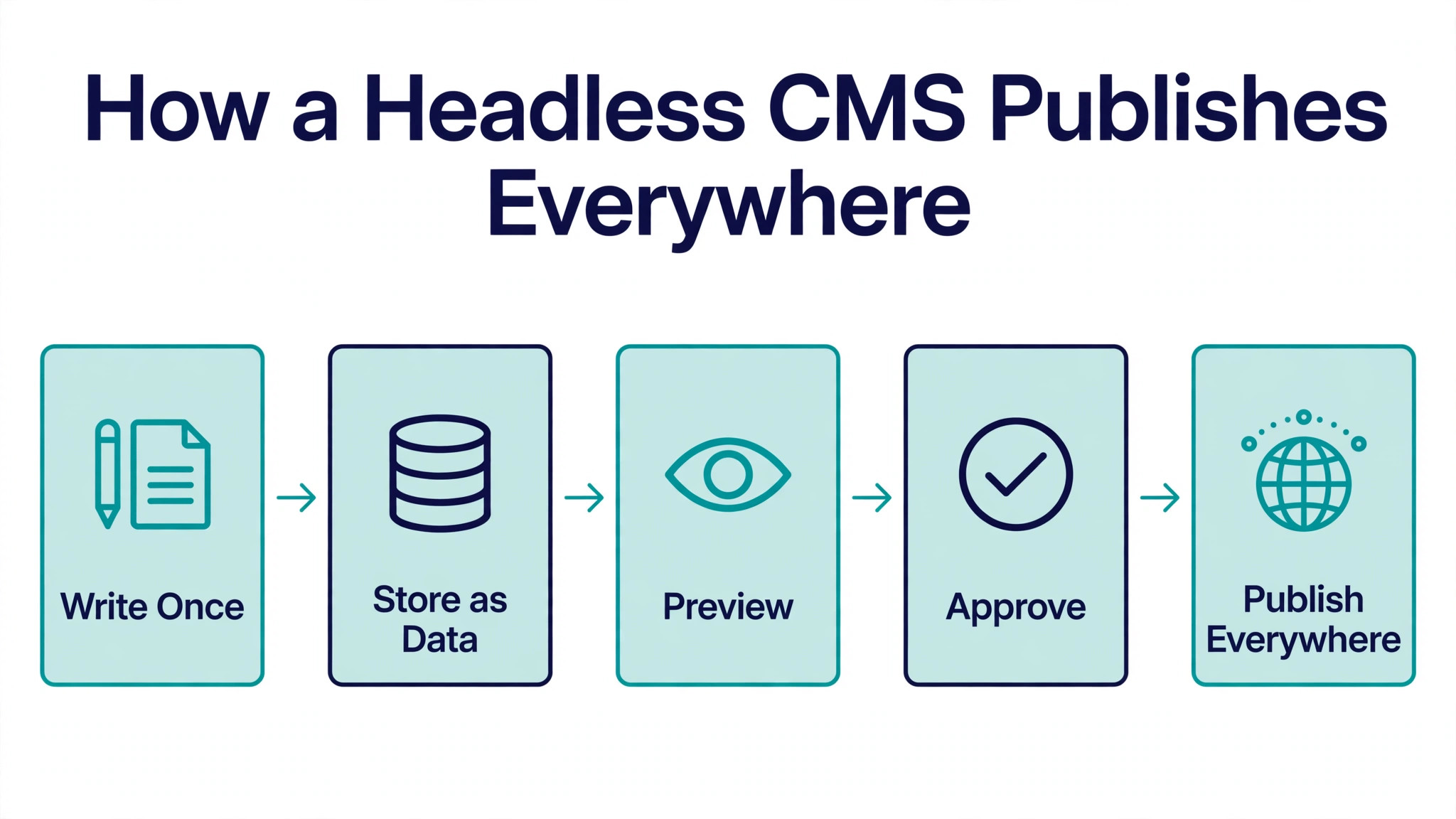
Moving to Headless Without Breaking Your Site
The top 10 headless cms all share one trait. The setup is quick, but the habits around Sanity decide whether the tool earns its keep, so the steps below cover the habits as well as the clicks.
- Write Once. Draft the content once in the editor your team likes, whether that is the Sanity studio, the Storyblok visual editor or the Prismic slice builder.
- Store as Data. Let the CMS store the piece as structured data with fields and relationships, not as a page locked inside one website template.
- Preview. Check the preview on the real front end before anything goes live, and fix the headline or the image while the change is still cheap.
- Approve. Run the approval step that Contentful and Contentstack handle best, so nothing reaches the public site without a second pair of eyes.
- Publish Everywhere. Push the same content to the website, the app and any other channel through the API, and let the front end render it for each one.
The mistake that costs teams the most is choosing on features and ignoring the content model. A headless CMS is only as good as the structure you design on day one. Spend a week mapping your content types, your fields and your relationships before you compare vendors. A clean model makes every later decision easy, and a messy one follows you for years. Bring your editors into that design session, because they know which fields they actually fill in and which ones they always leave blank.
API limits deserve a close read before you sign. Free tiers look generous until a busy site burns through its monthly calls. Contentful free covers 100,000 calls a month, Storyblok Starter covers the same, and Sanity free covers 250,000 requests. Count your pages, multiply by your traffic, and add a margin for previews and rebuilds. A site that rebuilds on every edit can use ten times the calls of a site that caches well, so your build setup matters as much as your traffic.
Preview is the feature buyers forget to test, and it is the one editors complain about first. A headless CMS without good preview forces writers to publish blind and fix mistakes live. Storyblok leads here with its live visual editor, and Sanity supports strong preview workflows once configured. During your trial, publish a test page, change a headline, and watch how fast the preview updates. If the loop feels slow on day one, it will feel worse on day one hundred.
Localisation is where cheap plans turn expensive. Adding a second language can mean paying per locale, per seat, or per space, depending on the vendor. Contentful Lite covers three locales, Sanity includes locales in its model without a separate charge, and Storyblok charges per locale on some tiers. If you plan to publish in two or more languages within a year, price that scenario now rather than discovering it at renewal time.
Security reviews are simpler with headless than with a classic CMS, because there is no public admin login on your website to attack. The API keys and the studio access become the things to protect. Use separate keys for preview and production, rotate them when staff leave, and keep the studio behind your team login rather than a shared password. These are small habits, and they remove most of the risk that makes security teams nervous about a new CMS.
The total cost of a headless build is mostly developer time, not the subscription. A $15 per seat plan with a four week build costs far more than a $300 plan with a one week build. Get a fixed quote for the front end before you choose the CMS, and ask the developer which tools they have shipped before. A team that knows Sanity will build faster on Sanity than on a tool they are learning, and that speed is worth more than any feature gap on a comparison page.
Run the steps in order and Sanity will do the heavy lifting while the checks above keep the launch from becoming a rescue job.
Frequently Asked Questions
What is a headless CMS in plain terms?
A headless CMS stores your content in one place and delivers it through an API to any front end you choose. The writing side and the display side are separate, so the same article can feed a website, an app and a smart display without being copied three times. Traditional systems glue the editor to one website template, which is why a redesign often means re-entering content. Headless removes that glue, and the trade is that you need a developer to build the front end.
Is a headless CMS overkill for a small site?
For a simple five page brochure site, yes. A classic CMS or a site builder will be faster and cheaper. Headless earns its keep when you publish to more than one channel, when several editors work at once, or when your front end needs a modern framework. If none of those apply, start simple and move later. Your content can migrate when the need arrives, and the tools here all offer import paths. That answer is the same across the top 10 headless cms. The tool matters less than the habit, and the habit around Sanity is what the rest of this guide is built to teach.
How much does a headless CMS cost each month?
The honest range on this list runs from free to $300 a month for a small team. Sanity, Strapi, Prismic and Directus all offer free tiers that cover real production use. Storyblok Growth is $99 a month, Hygraph Growth is $199 a month, and Contentful Lite is $300 a month. The bill that surprises buyers is rarely the subscription. It is the developer time to build and maintain the front end, so budget for that first.
Which headless CMS is easiest for non-developers?
Storyblok and Prismic are the friendliest for editors, because both show the page while you work and keep the model simple. Sanity has a steeper first week but becomes fast once the studio is shaped to your content. Strapi and Directus ask more of developers at setup and less of editors afterwards. If your editors will live in the tool daily, let them trial the editor before you sign anything.
Can I move my content out of a headless CMS later?
Yes, and this is one of the strongest arguments for the category. Content stored as structured data exports cleanly through the API, so moving to another headless tool is a data job, not a rewrite. Open source options such as Strapi and Directus make exit even easier, because you hold the database. Check the export story before you commit, and keep your content model documented from day one.
Do I still need a developer with a headless CMS?
Yes, for the build and for ongoing front end work. Editors can publish freely once the site is live, but somebody must build the front end, connect the API and keep it updated. The smallest teams pair a headless CMS with a static site generator and a freelance developer for the initial build. Budget a few weeks of developer time for the first version, then a small monthly retainer for changes.
Our Pick, Stated Plainly — Sanity Wins the Headless Race
If you buy one tool from this top 10 headless cms list, buy Sanity. It is the pick that fits the most buyers, and Sanity holds that spot at the fairest price, with the fewest regrets after six months.
The runner-up is Contentful, and it wins when the most mature ecosystem matters more than the winner. Everyone else should start with Sanity and trial the runner-up only if a specific need in this guide points there.