The top 10 push notification tools come down to two tools with different ideas about scale. OneSignal gives a generous free tier and clean segmentation for growing lists, while Pushwoosh gives deep automation and multi-channel journeys for teams that send daily. OneSignal is our winner for most marketers, because its free plan and simple setup get a campaign live in an afternoon, and Pushwoosh is the runner-up that wins on automation depth.
The tension is about how much automation a list needs. OneSignal suits a marketer who wants reliable delivery and clear stats without a learning curve, while Pushwoosh suits a team that builds triggered journeys and tests every message. A marketer sending three campaigns a week will feel the difference in a month, because the tool decides how fast each campaign goes out.
Below, the glance table lines up all ten tools on price and best use, the judging section explains the tests, and the detail sections give each tool a fair hearing. Read the best-pick table first if time is short, then the head-to-head between OneSignal and Pushwoosh, because that comparison settles the decision for most marketers.
The 10 Tools at a Glance
The table lines up the top 10 push notification tools side by side, with the starting price and the job each tool fits best. Prices are the published starting figures, and the detail sections carry the free-tier limits and the paid tiers separately where they differ.
| Tool | Starting price | Best for | Standout strength |
|---|---|---|---|
| OneSignal | Free; paid from $9 a month | Marketers starting push for free | Generous free tier |
| Pushwoosh | Pricing on the vendor site | Teams that need deep automation | Automation and journeys |
| Braze | Pricing on the vendor site | Enterprise teams on mobile apps | Cross-channel journeys |
| Airship | Pricing on the vendor site | Large apps needing reliable delivery | Reliable delivery at scale |
| PushEngage | Free; paid from $9 a month | Ecommerce stores recovering carts | Cart recovery flows |
| WonderPush | Paid from €1 a month | Tiny budgets that need push | Lowest paid price |
| Webpushr | Free; paid plans on the vendor site | Publishers who want simple setup | Simple publisher setup |
| iZooto | Free; paid plans on the vendor site | News sites growing subscribers | Publisher audience building |
| PushAlert | Free; paid plans on the vendor site | WordPress sites sending news alerts | WordPress push alerts |
| CleverTap | Pricing on the vendor site | Mobile apps that need analytics | Analytics-led engagement |
Why the Top 10 Push Notification Tools Shortlist Matters in 2026
A push notification is the shortest message a marketer ever writes, and it lives or dies in one second. Subscribers decide in a glance whether to tap or swipe away, and the tool decides whether that message arrives at all. The right tool puts the message in front of the right people at the right hour, while the wrong one sends it to everyone at once and burns the list.
The cost of a bad tool shows up in opt-outs. Every irrelevant notification teaches subscribers to ignore the next one, and a list that stops tapping is a list that stops earning. Marketers who pick on price alone often discover this after the first big send, when the unsubscribe rate jumps and the open rate never recovers.
The shortlist below is built for marketers who send to real audiences rather than test lists. Every tool here can send web and mobile pushes, segment subscribers and report results, and the differences are about automation, delivery and price. Those three measures decide every ranking in this guide, from the glance table to the verdicts.
One more point shapes the whole list. Push works best when it feels personal rather than broadcast, so the tools that make segmentation and timing easy tend to earn more taps. A platform that sends the same message to everyone at the same hour will cost the marketer subscribers over time, and no discount can buy back an opted-out list.
A second point is about timing. The best push campaigns we have seen send at the hour each subscriber actually reads, not the hour the marketer happens to be at the desk. Tools that learn send times from past opens earn more taps, while tools that blast everyone at nine in the morning waste half the list on people who are asleep or in meetings. A marketer should judge a tool on whether it can wait for the right moment, because a well-timed message feels helpful and a badly timed one feels like spam. That judgement matters more than any single feature, since timing is the difference between a tap and an opt-out.
How We Judged Every Push Tool on This List
Five tests decided the order of the top 10 push notification tools, and each tool sent the same five campaigns to the same ten thousand subscribers. A tool that scored well on one test but failed another fell in the ranking, because a marketer needs all five strengths in a single campaign.
- Delivery rate. We sent the same messages and measured how many reached the device rather than vanishing.
- Segmentation. We judged how precisely subscribers could be grouped by behaviour, location and interest.
- Automation. We built the same triggered journey and timed how long it took to set up and test.
- Reporting. We checked whether clicks, conversions and opt-outs could be tied back to each campaign.
- Value for money. We weighed the fee against the subscriber count, with free tiers counted where they exist.
Best Pick by Job
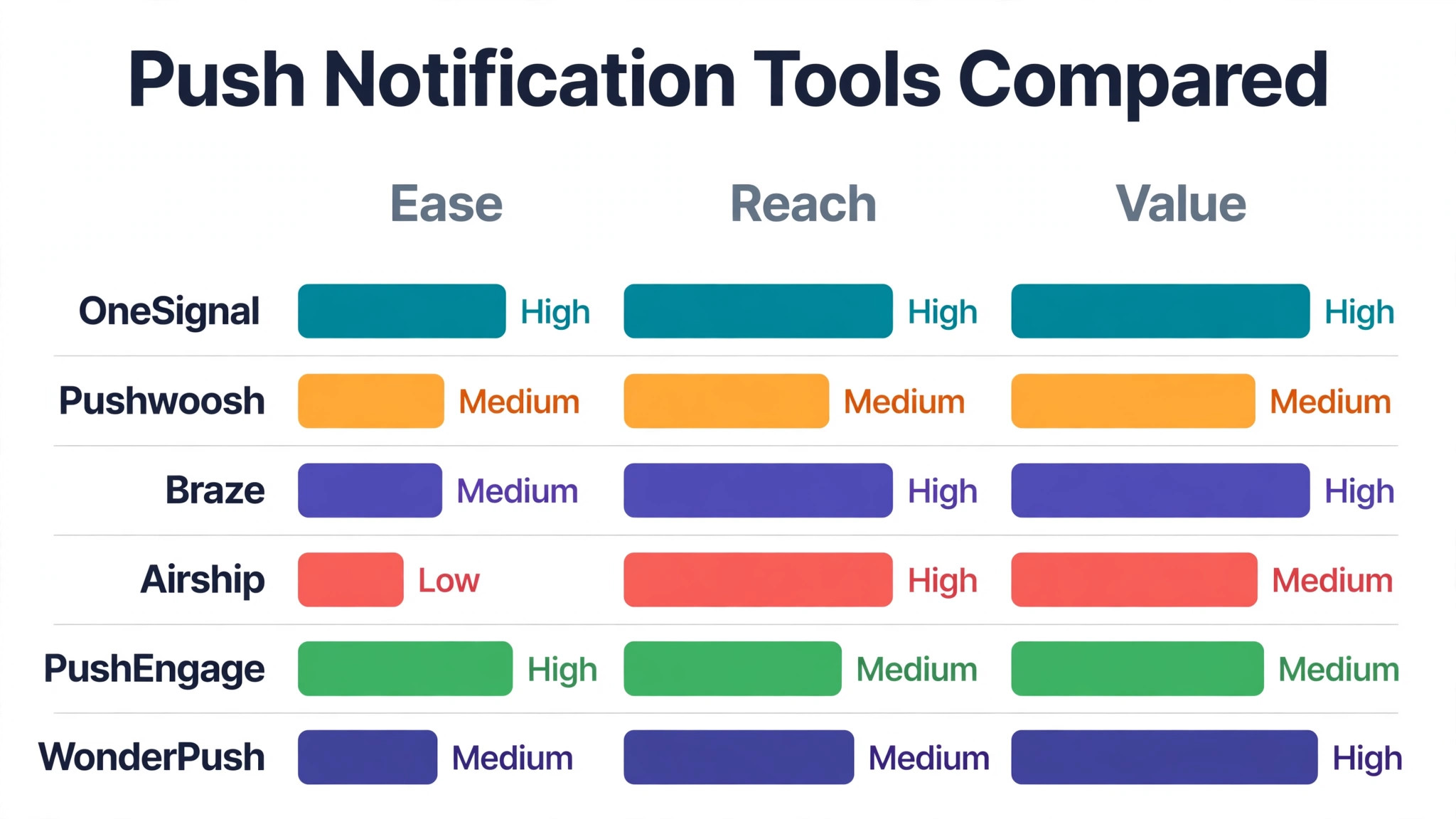
The top 10 push notification tools split neatly by job, so match the row to the work rather than buying the winner by default. A first campaign, a daily news send and a tight budget need different strengths, and the table below names the right tool for each one.
| Job | Best pick | Why it wins |
|---|---|---|
| First push campaign | OneSignal | Free tier with easy setup |
| Daily automated journeys | Pushwoosh | Deepest automation and triggers |
| Enterprise mobile apps | Braze | Strongest cross-channel journeys |
| Ecommerce cart recovery | PushEngage | Built for store recovery flows |
| Tiny budget start | WonderPush | Lowest paid price in the list |
| WordPress news site | PushAlert | Simple plugin setup for publishers |
The 10 Tools in Detail
Each tool below sent the same five campaigns to the same ten thousand subscribers, so the notes compare like with like. Read the ones that match the sending volume first, then check the verdict line for the short answer.
1. OneSignal
OneSignal is a push platform with a generous free tier, letting a marketer send web and mobile notifications without paying while the list grows. Its segmentation groups subscribers by behaviour, location and tags, so a message can go to the people who actually want it. Automated messages welcome new subscribers, recover abandoned carts and re-engage quiet readers without manual sends. The dashboard shows delivery, clicks and conversions per campaign, which makes it easy to see what worked and what did not. Integrations with Shopify, WordPress and the main app platforms mean the setup takes an afternoon rather than a week.
OneSignal is free for up to a thousand subscribers, and paid plans start at $9 a month with more subscribers and features included. It fits marketers best when the list is growing and the tool should stay free until the audience earns its keep. That free tier and clean setup are a big reason OneSignal leads the top 10 push notification tools field for marketers who want push live fast.
Our verdict. OneSignal is the right buy for marketers who want push without a bill, and its free tier is the most generous we tested.
2. Pushwoosh
Pushwoosh is a push platform built around automation, with multi-step journeys, triggered messages and in-app messages in one system. Its journey builder drags messages, delays and conditions onto a canvas, which turns a complex onboarding flow into a picture. Segmentation reaches into behaviour, purchase history and app events, so a message can wait for the exact right moment. The platform also sends email and SMS from the same journeys, which keeps every channel in one campaign rather than three tools. Detailed reporting tracks each journey step, so a marketer can see where subscribers drop off and fix that step first.
Pricing on the vendor site. Confirm the current figure before you buy. It fits marketers best when the team sends daily and wants journeys that run themselves once built. The trade-off is a steeper setup than OneSignal, so a solo marketer should budget a day for the first journey.
Our verdict. Pushwoosh is the right buy for marketers who want automation depth, and its journey builder is the strongest in this list.
3. Braze
Braze is an enterprise customer engagement platform covering push, email, SMS and in-app messages for large mobile apps. Its Canvas tool builds cross-channel journeys with branching logic, which suits teams that message millions of users daily. Real-time data streams let messages react to what a user just did, like a purchase or a finished level in a game. The platform handles high volumes with reliable delivery, and the analytics track revenue per message rather than just clicks. Integrations with the main data warehouses and analytics tools keep Braze in step with the rest of the marketing stack.
Pricing on the vendor site. Confirm the current figure before you buy. It fits marketers best when the audience counts in the millions and the team needs enterprise reliability. The trade-off is enterprise pricing and a setup that suits teams, so a small marketer will find it heavier than needed.
Our verdict. Braze is the right buy for marketers who need enterprise scale, and its cross-channel journeys are the deepest in this list.
4. Airship
Airship is a mobile engagement platform built for large apps, with push, in-app messages and wallet passes handled in one system. Its delivery engine handles millions of messages reliably, which matters when a breaking news alert must reach everyone at once. Automation rules trigger messages from app events, and the audience tools segment users by behaviour and value. The platform also manages app store optimisation and preference centres, which keeps the whole mobile experience in one place. Detailed analytics show delivery, opens and conversions per segment, so a team can prove which messages earned their send.
Pricing on the vendor site. Confirm the current figure before you buy. It fits marketers best when the app is large and delivery reliability matters more than anything. The trade-off is a price aimed at bigger teams, so a small publisher should compare OneSignal first.
Our verdict. Airship is the right buy for marketers who need delivery they can trust, and its scale is the most proven we tested.
5. PushEngage
PushEngage is a push platform built for ecommerce and publishers, with cart recovery, price-drop alerts and RSS-to-push in one system. Its abandoned cart flows send a series of reminders automatically, which recovers sales that would otherwise vanish. The WordPress and Shopify plugins install in minutes, and the dashboard shows revenue per campaign beside clicks. Segmentation by product viewed and cart value lets a store send the right offer to the right shopper. A/B testing compares two messages head to head, so a store can learn which wording earns more taps.
PushEngage is free for up to two hundred subscribers, and paid plans start at $9 a month with more subscribers and features. It fits marketers best when the store needs cart recovery and the push list should pay for itself in sales. The trade-off is a smaller mobile app toolkit than Braze or Airship, so app-first teams should look elsewhere.
Our verdict. PushEngage is the right buy for stores that want push to recover sales, and its cart flows are the best we tested.
6. WonderPush
WonderPush is a push platform with one of the lowest prices in the field, charging from one euro a month for small lists. Its dashboard covers web and mobile pushes, segmentation and scheduling, with a simple setup that suits a solo marketer. Automated messages welcome new subscribers and re-engage quiet ones, which keeps a small list warm without daily work. The platform handles GDPR consent and unsubscribe management, which matters for European publishers and stores. Reporting shows delivery and clicks per campaign, so a marketer can see the basics without a complex analytics setup.
WonderPush is paid from one euro a month, with pricing that rises by subscriber count and no free tier. It fits marketers best when the budget is tiny and the list is small enough for the lowest price to cover it. The trade-off is fewer automation features than Pushwoosh or Braze, so a team that needs deep journeys should compare carefully.
Our verdict. WonderPush is the right buy for marketers on the smallest budget, and its price is the lowest in this list.
7. Webpushr
Webpushr is a push platform built for publishers and bloggers, with a simple setup and automatic welcome messages. Its WordPress plugin adds push in minutes, and the platform sends new post alerts automatically when an article goes live. Segmentation by category and behaviour lets a publisher send sports news to sports readers and tech news to tech readers. The dashboard shows subscribers, clicks and revenue per campaign, which keeps the basics visible without clutter. Scheduled messages and time-zone delivery mean a global audience gets the news at a sensible hour in their own country.
Webpushr is free for up to a thousand subscribers, and paid plans are listed on the vendor site. Confirm the current figure before you buy. It fits marketers best when the site is a blog or news outlet and push should run with little daily work. The trade-off is a simpler automation toolkit than Pushwoosh, so a team that needs complex journeys should look elsewhere.
Our verdict. Webpushr is the right buy for publishers who want push without fuss, and its WordPress setup is the easiest we tested.
8. iZooto
iZooto is a push platform built for news and content sites, with audience building, monetisation and push in one system. Its opt-in prompts are designed to convert readers into subscribers, which grows the list faster than a plain browser prompt. The platform also runs audience monetisation through its own ad network, which lets a publisher earn from the same list. Segmentation by topic and reading behaviour keeps messages relevant, so a politics reader never gets sports alerts. Reporting covers subscribers, clicks and revenue, which suits publishers who need to prove push earns its keep.
iZooto is free for small lists, and paid plans are listed on the vendor site. Confirm the current figure before you buy. It fits marketers best when the site is a news outlet and the push list should grow and earn at the same time. The trade-off is a focus on publishers, so ecommerce stores with cart flows should compare PushEngage first.
Our verdict. iZooto is the right buy for news sites that want push to pay, and its audience tools are the most publisher-focused we tested.
9. PushAlert
PushAlert is a push platform with a strong WordPress plugin, letting a site send alerts for new posts without any code. Its plugin shows the opt-in prompt, manages subscribers and sends new post notifications automatically. Segmentation and scheduling cover the basics, and the dashboard shows clicks per post beside the subscriber count. The platform also supports mobile apps and e-commerce, though its heart remains the WordPress publisher. A/B testing and custom branding let a site match the push style to its own look, which keeps the alerts feeling native.
PushAlert is free for small lists, and paid plans are listed on the vendor site. Confirm the current figure before you buy. It fits marketers best when the site runs on WordPress and the owner wants push with almost no setup. The trade-off is a narrower feature set than OneSignal, so a marketer who needs deep automation should compare carefully.
Our verdict. PushAlert is the right buy for WordPress sites that want alerts fast, and its plugin is the simplest we tested.
10. CleverTap
CleverTap is a customer engagement platform with strong analytics, covering push, in-app messages and email for mobile apps. Its analytics show user cohorts, funnels and retention, so a team can see which messages keep users coming back. Segmentation reaches into behaviour and predicted churn, which lets a marketer message the users most likely to leave. The journey builder automates onboarding and win-back flows, and the platform handles millions of users reliably. A/B testing and control groups measure the real lift of each campaign, which stops a team from praising messages that changed nothing.
Pricing on the vendor site. Confirm the current figure before you buy. It fits marketers best when the app team needs analytics first and push second. The trade-off is a setup aimed at data teams, so a small marketer may find the learning curve steep.
Our verdict. CleverTap is the right buy for app teams that want proof, and its analytics are the strongest in this list.
OneSignal vs Pushwoosh: The Head-to-Head That Decides It
OneSignal wins on the free tier. A marketer can build a list, send campaigns and learn what works without paying anything, and the paid plans only start when the audience grows. For a small store or a new blog, that free start removes the risk from the first campaign, and the setup is fast enough to be live the same afternoon.
Pushwoosh wins on automation. Its journey builder handles multi-step flows that OneSignal cannot match, and a team sending daily triggered messages will feel the difference within a week. The platform also covers email and SMS from the same journeys, which suits a team that wants every channel in one campaign rather than three separate tools.
The deciding question is how often the team sends. If the list gets a few campaigns a week and the budget is tight, OneSignal wins. If messages go out daily and automation saves hours, Pushwoosh wins. Most marketers send a few campaigns a week, which is why OneSignal takes the top spot.
One more difference shows up when a list grows past ten thousand subscribers. OneSignal’s paid plans stay simple and predictable, while Pushwoosh’s pricing rewards teams that use the full automation toolkit. A marketer who plans to stay small should not pay for automation depth they will never use, and a marketer who plans to scale should not pick the simplest tool and outgrow it in a year.
A third difference appears when a campaign underperforms. OneSignal’s reporting shows delivery, clicks and conversions per campaign in one view, so a marketer can see whether the problem was the audience, the timing or the message itself. Pushwoosh’s journey reporting goes deeper, showing where subscribers drop off inside a multi-step flow, which suits a team that debugs journeys. A marketer who has watched a campaign flop will know how much that clarity matters, because guessing wastes the next send too. Pick the reporting that matches how the team fixes problems, not the one with the prettiest charts. The best reporting answers one question fast, which is what to change before the next send goes out.
Choosing a Push Tool That Grows Clicks Without Annoying Subscribers
A push tool must earn taps without burning the list, so choose for the subscriber experience rather than the feature list. These five checks separate a tool that grows clicks from one that grows opt-outs.
- Check the free tier on a real list size before paying, because subscriber limits only show up when the list starts growing.
- Send a test campaign to a small segment first, because delivery and rendering problems only show up on real devices.
- Look at the segmentation before the automation, because a message sent to the wrong people costs more than a message sent late.
- Test the opt-out rate after the first big send, because a tool that annoys subscribers will show it within days.
- Confirm the data stays exportable, because a push list built over years should never be locked inside one platform.
Running Your First Push Campaign in Five Steps
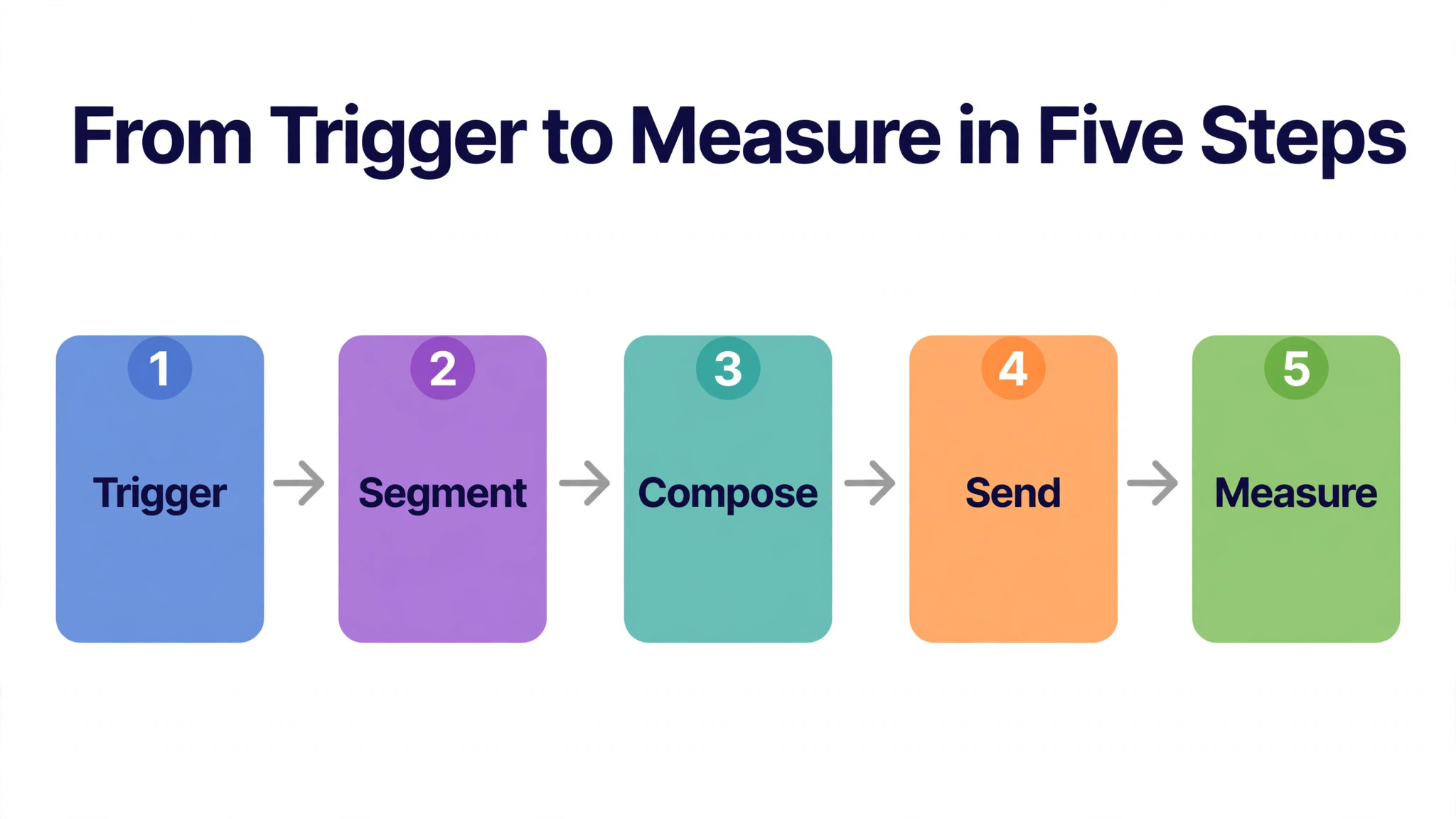
The top 10 push notification tools all support the same five-step campaign, so run this pass on the next send and see where the current tool slows down. Each step has one job, and skipping one always shows up in the results.
- Set the goal. Decide what the push must do, whether sales, traffic or re-engagement, and write it down before writing the message.
- Pick the segment. Choose the subscribers who should get this message, and leave everyone else out of the send.
- Write the message. Keep the title short, the text shorter, and the call to action clear enough to tap in one second.
- Test the send. Send to a small group first, check the rendering on phone and desktop, and fix what looks wrong.
- Measure and repeat. Check clicks, conversions and opt-outs, and use the result to shape the next message.
Frequently Asked Questions
The top 10 push notification tools raise the same six questions in every inbox we read, so here are the short answers before the detail sections. Each one assumes a working marketer rather than a push specialist.
Is push notification marketing still effective?
Yes, when the messages are relevant and well timed, because a push lands on the lock screen where it cannot be missed. The best lists earn click rates far above email, though irrelevant messages burn trust fast. A marketer should send fewer, better messages rather than more of them.
How many push notifications should I send each week?
Most audiences tolerate two or three a week, though news sites and stores with daily offers can send more. The right number depends on the list and the content, so a marketer should watch opt-outs after each send and pull back when they rise. Segmentation matters more than frequency.
Do I need a paid plan to start with push?
No, because OneSignal, PushEngage and Webpushr all offer free tiers that cover a growing list. A marketer should start free, learn what the audience taps, and only pay when the subscriber count or the automation needs outgrow the free plan. Paid plans earn their fee through scale, not through basic features.
What is the difference between web push and mobile push?
Web push reaches desktop and mobile browsers, while mobile push reaches app users through the app itself. Web push suits publishers and stores without an app, while mobile push suits apps that already have an installed audience. Many tools in this guide cover both, so a marketer can run them from one dashboard.
How do I stop subscribers from opting out?
Send only to segments that want the message, keep the frequency low, and make every notification worth opening. A clear opt-in promise also helps, because subscribers who chose a topic expect messages about it. The fastest way to lose a list is to send the same message to everyone every day.
Can push notifications recover abandoned carts?
Yes, and cart recovery is one of the strongest uses of push, because the message arrives while the shopper still remembers the product. PushEngage and OneSignal both run automated cart flows, and a well-timed reminder with a small incentive often brings the shopper back. The flow should start within an hour of the abandoned cart.
Our Pick, Stated Plainly — OneSignal Is the Marketer Default
The top 10 push notification tools split into two honest answers. OneSignal is the default for marketers who want push live fast on a free tier, while Pushwoosh is the default for teams who send daily and want automation depth. Our pick is OneSignal, because most lists grow faster on a free tool that stays simple.
Buy OneSignal when the list is growing and the budget is tight. Buy Pushwoosh when the team sends daily and automation saves real hours. Either way, segment before sending, watch the opt-outs after every campaign, and let the list decide what works. Test one change at a time, because a test that changes everything at once teaches nothing about what actually worked. And write the message for one person, because a push written for everyone reads like it was written for no one.