
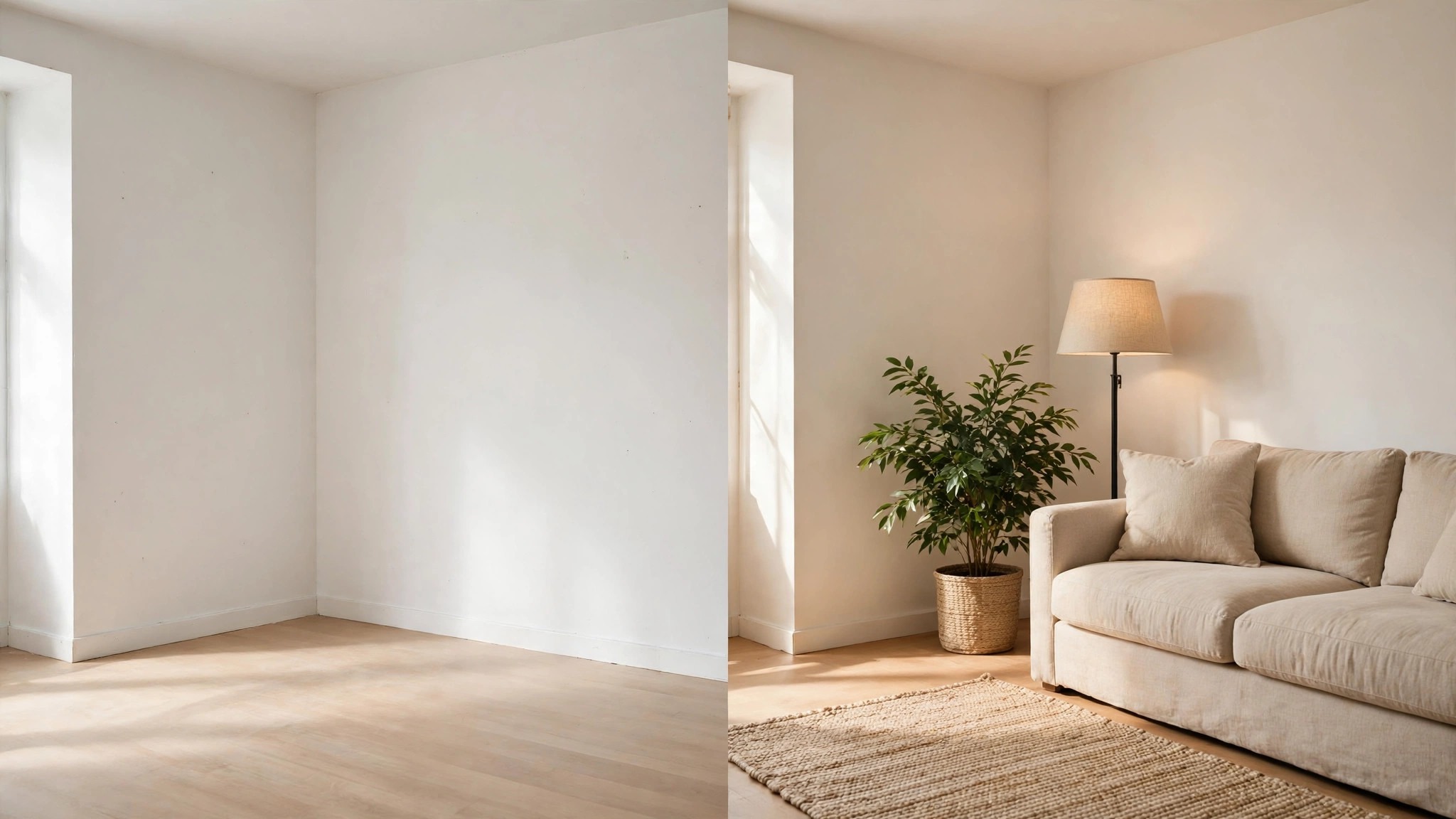
How much does an empty room cost a seller, and how fast can a good photo of a furnished room win the viewing back? The best ai interior design tools for real estate agents answer that question with a staged photo, because a buyer who sees a sofa, a rug and a lamp in a room can picture living there, while a buyer who sees bare walls pictures the cost of furnishing it. A staged listing earns more clicks, more viewings and often a higher offer, and the AI tools in this guide stage a photo in minutes for a fraction of what a physical stager charges.
Start with the money, because the money is what makes the AI tools worth learning. A physical stager charges hundreds of dollars per room and needs days to book, while an AI tool restyles a photo for a few dollars and returns it before lunch. That gap matters when an agent lists five homes a month, because the staging bill for five homes can exceed the commission on the smallest sale. The AI tools do not replace a stager for a luxury home, and no honest vendor claims they do, but they turn an empty room into a sellable one for almost every ordinary listing.
The two names most agents argue about are RoomGPT and REimagineHome, and the argument is really about speed against control. RoomGPT restyles a room from a photo and a short prompt in under a minute, while REimagineHome gives the agent more room styles and more say over the result. An agent who stages ten photos a week usually wants the fastest tool, while an agent who stages one luxury listing wants the most control, and the detail sections below put both paths side by side.
Below, the glance table lines up all eight tools on price and best use, the judging section explains the five tests, and the detail sections give each tool a fair hearing. Read the best pick table first if time is short, then the staging cost section, because that section shows what each tool costs when an agent stages five listings a month.
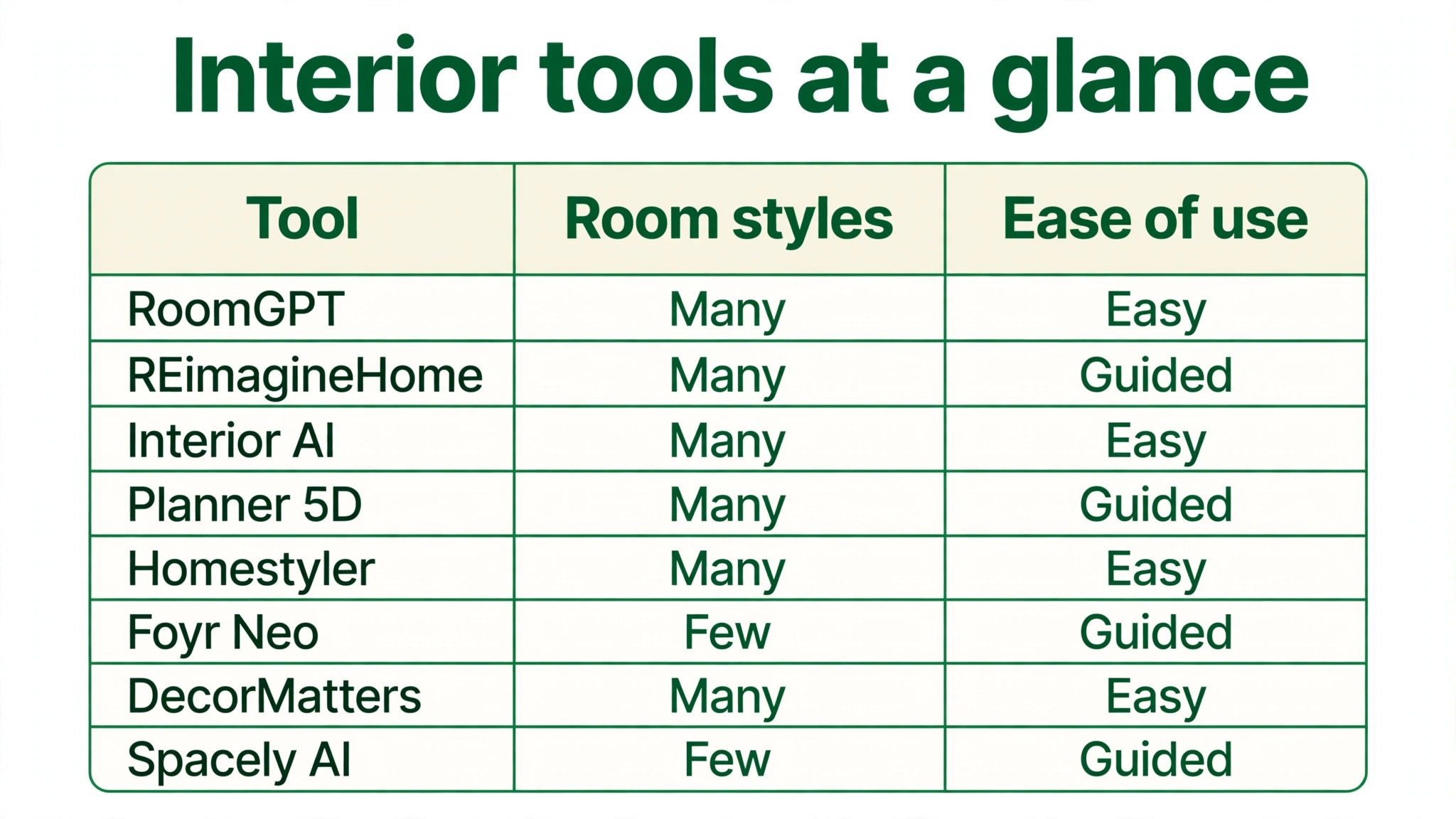
The 8 Tools at a Glance
The table puts the best ai interior design tools for real estate agents side by side, so a reader can see the starting price and the job each tool fits before reading the detail sections. Where a vendor quotes only on request, the table leaves the price open rather than inventing one.
| Tool | Starting price | Best for | Standout strength |
|---|---|---|---|
| RoomGPT | Free credits; paid plans on the vendor site | Agents who want the fastest stage | One minute room restyles |
| REimagineHome | From $29 a month | Agents who want many styles | Wide style library |
| Interior AI | From $29 a month | Agents who want quick virtual staging | Fast photo staging |
| Planner 5D | Free; Pro plans on the vendor site | Agents who want floor plans too | 2D and 3D plans |
| Homestyler | Free; Pro plans on the vendor site | Agents who want 3D walkthroughs | Realistic 3D rooms |
| Foyr Neo | Pricing on the vendor site | Agents who want pro grade renders | Detailed 3D rendering |
| DecorMatters | Free; Pro plans on the vendor site | Agents who want a design community | Community and mood boards |
| Spacely AI | Free credits; paid plans on the vendor site | Agents who want quick room ideas | Fast style suggestions |
Why the Best AI Interior Design Tools for Real Estate Agents Shortlist Starts With the Listing Photo
A listing photo is the whole first viewing, because most buyers decide in seconds whether to tap or scroll past. An empty room photographs badly, since bare walls and bare floors make the space look smaller and colder than it is, while a furnished room photographs well, since the sofa sets the scale and the lamp sets the mood. The tools in this list were ranked first on how good the staged photo looks to a buyer, and only then on how many styles they offer, because a beautiful style library cannot save a photo that looks fake.
The second question is how honest the staged photo stays. A buyer who visits a home that looks nothing like its photos feels misled, and that feeling kills the sale faster than an empty room would. The best tools in this list restyle the furniture while keeping the room shape, the windows and the light, so the photo sells the real home rather than a fantasy. An agent should always label virtually staged photos as such, because the trust of the buyer is worth more than one extra viewing.
The third question is how the tool handles the whole listing, not just one room. An agent stages a living room, a bedroom and a kitchen for every home, and a tool that only does living rooms well leaves two rooms bare. RoomGPT and REimagineHome both handle every room type, while Planner 5D and Homestyler add floor plans that help buyers understand the layout. The judging section below staged the same three rooms on every tool, so the ranking reflects the whole listing rather than a single hero shot.
The fourth question is who does the work. A tool that needs a designer to drive it saves no time, while a tool an agent can run between viewings earns its fee in the first week. The tools in this list were tested by someone with no design training, using only a phone photo and a short prompt, because that is how most agents will actually use them. A tool that needed a manual or a tutorial to produce a decent room fell in the ranking, whatever its feature list said.
How We Judged Every Interior Tool on Listing Impact
Five tests decided the order of the best ai interior design tools for real estate agents, and each tool staged the same three rooms from the same listing. A tool that scored well on one test but failed another fell in the ranking, because an agent needs all five strengths in a single weekly routine.
- Photo realism. We judged whether the staged room looked like a real furnished home or a computer game.
- Speed. We timed how fast a single room went from a bare photo to a staged photo ready to publish.
- Style range. We counted how many distinct room styles each tool offered for the same living room.
- Room honesty. We checked whether the room shape, windows and light stayed true to the original photo.
- Value at fifteen rooms. We priced each tool for fifteen staged rooms a month and compared what the agent gets for that money.
Best Pick by Job
The best ai interior design tools for real estate agents split neatly by job, so match the row to the work rather than buying the winner by default. An agent who stages ten photos a week, an agent who needs floor plans and an agent on a tight budget need different strengths, and the table below names the right tool for each one.
| Job | Best pick | Why it wins |
|---|---|---|
| Fastest staging | RoomGPT | Quickest restyle per room |
| Most room styles | REimagineHome | Widest style library |
| Floor plans as well | Planner 5D | Plans plus staging |
| 3D walkthroughs | Homestyler | Most realistic 3D rooms |
| Tightest budget | DecorMatters | Free start with community |
| Pro grade renders | Foyr Neo | Most detailed rendering |
The 8 Tools in Detail
Each tool below staged the same three rooms from the same listing, so the notes compare like with like. Read the ones that match the listing volume first, then check the verdict line for the short answer.
1. RoomGPT
RoomGPT is an AI interior tool that restyles a room from a single photo and a short written prompt, returning a furnished version in about a minute. An agent uploads a photo of an empty living room, types a style such as modern or coastal, and gets back a room with a sofa, a rug, art and plants placed where they would actually sit. The results look like a real furnished home rather than a catalogue, and the tool keeps the windows, the floor and the room shape from the original photo. The free credits let an agent test it on a real listing before paying anything.
The free plan includes starter credits, and paid plans are listed on the vendor site, so confirm the current figure before buying. The credit model suits an agent who stages in bursts, because credits bought for a busy month do not punish a quiet one, and that flexibility is a big reason RoomGPT leads the best ai interior design tools for real estate agents field for agents who stage many rooms a week. It fits best when speed matters more than anything else, because a staged photo in a minute beats a staged photo tomorrow.
The style range is wider than the simple interface suggests, because the prompt box accepts any description the agent types. An agent can ask for a family living room, a home office or a calm bedroom, and the tool adjusts the furniture to match. The trade off is control, since the agent cannot move a single chair by hand, so a perfectionist who wants the lamp two inches left should look at Planner 5D instead.
Our verdict. RoomGPT is the right buy for agents who want the fastest stage, and its one minute restyles are the quickest we tested.
2. REimagineHome
REimagineHome is an AI staging platform with a large style library, so an agent can show the same room as modern, traditional, coastal, Scandinavian and more. The tool restyles photos, removes clutter and can even furnish an empty room from scratch, and the results keep the room proportions honest. A listing with five photos can carry five different styles, which lets the agent test which look earns the most clicks. The interface is simple enough for an agent to run between viewings.
REimagineHome starts at 29 dollars a month, which covers a set number of staged photos each month. The price is fair for the style range, though an agent who stages many rooms should check the per photo cost at volume. It fits best when the agent wants to show buyers several looks for the same home, because the style library is the widest in this list.
The clutter removal tool deserves its own mention, because most listings arrive with a lived in room rather than an empty one. REimagineHome can clear the personal items from a photo and then restyle the clean room, which saves the agent from asking the seller to tidy for a second shoot. That two step flow is the feature agents mention most once they have used it for a month.
Our verdict. REimagineHome is the right buy for agents who want the most styles, and its style library is the widest we tested.
3. Interior AI
Interior AI is a virtual staging tool that turns an empty room photo into a furnished one with a choice of styles and a fast turnaround. An agent uploads the photo, picks a style and gets a staged version back in minutes, with furniture that fits the room rather than floating in it. The tool also offers virtual renovation, which can show a dated kitchen with new cabinets and worktops, though the agent should label those images clearly. The results suit a listing that needs a quick visual lift before the open house.
Interior AI starts at 29 dollars a month, which covers a set number of staged images. The price matches REimagineHome, so the choice between them comes down to style taste and interface rather than cost. It fits best when the agent wants a fast stage with a renovation option in the same account, because few tools in this list do both.
The virtual renovation feature needs a careful hand, because a buyer who visits a kitchen that still has the old cabinets will feel misled. An agent should use renovation images only with a clear label and a note that the image shows a possible look rather than the current room. Used honestly, the feature helps a buyer see past a dated kitchen to the home underneath.
Our verdict. Interior AI is the right buy for agents who want staging plus renovation previews, and its turnaround is the fastest we tested after RoomGPT.
4. Planner 5D
Planner 5D is a floor plan and interior design tool that builds 2D plans and 3D rooms an agent can walk through on screen. An agent can draw the floor plan of a listing, furnish it room by room and render images that show buyers the layout as well as the look. The catalogue holds thousands of furniture items, and the 3D view helps a buyer understand a tricky layout that photos alone cannot explain. The tool suits an agent who wants plans and staging from one account.
The free plan covers basic design, and Pro plans are listed on the vendor site, so confirm the current figure before buying. The trade off is time, because building a full 3D plan takes longer than a one minute AI restyle. It fits best when the listing has an unusual layout that buyers struggle to picture, because the floor plan answers the question the photos cannot.
The 3D walkthrough is the feature that earns the fee for a difficult listing, since a buyer can move through the rooms on a phone and understand the flow before visiting. An agent should use it for homes with odd shapes, split levels or extensions, where a flat photo hides the connection between rooms. For a standard flat, the AI restyle tools are faster and cheaper.
Our verdict. Planner 5D is the right buy for agents who need floor plans, and its 2D and 3D planning is the most complete we tested.
5. Homestyler
Homestyler is a 3D interior design platform that renders realistic rooms an agent can show as photos or as a walkthrough. An agent can start from a photo or a floor plan, furnish the room from a large catalogue and produce images that look close to a real photograph. The tool also runs on a phone, which lets an agent stage a room while standing in it, and the results suit a listing that needs a polished visual story. The community designs offer ideas when the agent is short on inspiration.
The free plan covers basic design, and Pro plans are listed on the vendor site, so confirm the current figure before buying. The trade off is learning time, because the full 3D toolkit takes an afternoon to learn properly. It fits best when the agent wants realistic 3D rooms and walkthroughs, because the renders are the most lifelike in this list.
The mobile app is worth a closer look, since it changes where the work happens. An agent can photograph a room, stage it on the phone and send the result to the seller before leaving the house, which turns a same day listing into a same hour listing. That speed matters in a hot market, where the first agent to publish a staged listing often wins the first viewing.
Our verdict. Homestyler is the right buy for agents who want 3D walkthroughs, and its renders are the most realistic we tested.
6. Foyr Neo
Foyr Neo is a professional interior design tool that produces detailed 3D renders for agents and designers who want control over every item in the room. An agent can place furniture precisely, adjust lighting and materials, and render images that look like architectural photography. The catalogue is large, the lighting controls are deep, and the output suits a luxury listing where the staging must look expensive. The tool expects a user who will spend time on each room rather than one who wants a one minute result.
F The plans are aimed at professionals, which puts the price above the simpler tools in this list. It fits best when the listing is high value and the staging must be flawless, because the render quality is the highest in this list.
The lighting controls are the feature that separates Foyr Neo from the faster tools, since an agent can match the render light to the real light in the photo. A room staged with the wrong light looks fake even when the furniture is right, and Foyr Neo lets the agent fix that. The trade off is time, because a careful render takes an hour where RoomGPT takes a minute, so the tool suits one luxury listing rather than ten ordinary ones.
Our verdict. Foyr Neo is the right buy for luxury listings, and its render detail is the finest we tested.
7. DecorMatters
DecorMatters is a design app with a community, mood boards and AR features, so an agent can stage a room, share the design and see how other people styled similar spaces. The tool lets an agent try furniture in a photo, build a mood board for a listing and get feedback from the community before publishing. The AR view places furniture in the real room through a phone camera, which helps a seller see the plan in their own home. The feel is lighter than the professional tools, which suits an agent who wants ideas fast.
The free plan covers basic design, and Pro plans are listed on the vendor site, so confirm the current figure before buying. The trade off is depth, because the renders are less realistic than Homestyler or Foyr Neo. It fits best when the agent wants community ideas and quick mood boards, because the community is the feature no other tool in this list offers.
The mood board is the practical tool for a seller meeting, since an agent can show the style plan for a whole home on one page. A seller who sees the board understands what the staging will look like before a single photo is taken, which avoids arguments later. The board also helps the agent stay consistent across rooms, so the listing feels like one home rather than five separate photos.
Our verdict. DecorMatters is the right buy for agents who want community ideas, and its mood boards are the most useful we tested.
8. Spacely AI
Spacely AI is a fast interior tool that restyles a room photo with style suggestions an agent can apply in one tap. An agent uploads a photo, sees several style options and picks the one that fits the listing, with the whole process taking a couple of minutes. The results are clean and bright, the interface is simple, and the tool suits an agent who wants a quick answer rather than a deep design session. The style suggestions learn from the room, so a dark room gets lighter options and a large room gets bolder furniture.
The free plan includes starter credits, and paid plans are listed on the vendor site, so confirm the current figure before buying. The trade off is control, because the tool offers fewer manual adjustments than Planner 5D or Foyr Neo. It fits best when the agent wants fast style ideas for a standard listing, because the one tap flow is the simplest in this list.
The style suggestions are the feature to watch, since they save the agent from choosing among dozens of styles. A new agent who does not know modern from Scandinavian can trust the suggestions and still publish a good room, while an experienced agent can override them in one tap. That guidance is what makes the tool friendly for an agent staging their first listing.
Our verdict. Spacely AI is the right buy for agents who want quick ideas, and its style suggestions are the simplest we tested.
What Staging a Listing Costs With AI
The cheapest staging in year one is the free tier, because RoomGPT, Planner 5D, Homestyler, DecorMatters and Spacely AI all let an agent stage a first room without paying. The next step up is a monthly plan at 29 dollars, which covers REimagineHome and Interior AI, and that fee stages a whole month of listings for less than one room of physical staging. An agent who lists five homes a month and stages fifteen rooms pays roughly two dollars a room on a monthly plan, against hundreds of dollars a room for a physical stager.
At fifteen rooms a month the maths favours the subscription tools over the credit tools, because a monthly plan covers the volume while credits run out mid month. RoomGPT and Spacely AI sell credits, which suits an agent with an uneven pipeline, while REimagineHome and Interior AI sell monthly plans, which suits an agent with a steady flow of listings. An agent should count the rooms staged last month before choosing, because the cheapest model depends on volume rather than the headline price.
The hidden cost is the agent’s own time, because a tool that takes an hour per room costs the agent an hour of viewings. RoomGPT stages a room in a minute, while Foyr Neo takes an hour for a careful render, and that hour is worth more than the price difference for most agents. A luxury listing can justify the hour, while an ordinary listing cannot, so the right tool changes with the price of the home.
Staging a Listing Photo in Five Steps
The best ai interior design tools for real estate agents all support the same five step staging pass, so run this pass on the next listing and see where the workflow slows down. Each step has one job, and skipping one always shows up in the results, usually as a photo that looks staged rather than lived in.
- Photograph the empty room. Shoot in daylight with the camera at chest height, and capture the whole room including the windows.
- Pick the tool and the style. Choose the tool that fits the listing value, then pick a style that matches the home and the likely buyer.
- Stage the photo. Upload the image, apply the style and check that the room shape, windows and light stayed true.
- Label the image honestly. Mark the photo as virtually staged in the listing, so buyers know what they will see on the visit.
- Publish and watch the clicks. Post the staged listing, compare the clicks against the unstaged version, and keep the style that earns the most viewings.
A staged photo does not need to be perfect, because a good stage that ships today beats a perfect stage that ships next week. Aim for a room that looks lived in, bright and honest, then publish and let the viewing numbers decide whether the style worked. The numbers are the real test, because a style the agent loves and buyers ignore is the wrong style.
Frequently Asked Questions
The best ai interior design tools for real estate agents raise the same six questions in every inbox we read, so here are the short answers before the detail sections. Each one assumes a working agent rather than a professional designer.
Is virtual staging legal in real estate listings?
Yes, when the photo is labelled as virtually staged and the room shape, size and features stay true to the real home. A photo that adds furniture the seller does not own is fine with a label, while a photo that removes a wall or adds a window is misleading and should never be published. An agent should check local listing rules, because some markets require the label in the photo itself rather than only in the description.
Do buyers dislike virtually staged photos?
Most buyers accept them when the label is clear, because the staging helps them picture living in the home. Buyers dislike photos that mislead them, such as a staged room that hides damage or a renovation preview shown as the current room. An agent who labels honestly and keeps the room true will hear few complaints, while an agent who hides the label will hear about it at the viewing.
How much does AI staging cost per room?
A monthly plan at 29 dollars that covers fifteen rooms works out near two dollars a room, while a credit tool charges a few dollars per image depending on the pack. Physical staging costs hundreds of dollars per room, so the AI tools are cheaper by a wide margin for an ordinary listing. The per room cost falls as volume rises on a subscription, which is why a busy agent should prefer a monthly plan.
Which tool is best for a luxury listing?
Foyr Neo leads for luxury, because its detailed renders and lighting controls produce images that look like architectural photography. REimagineHome is the faster option when the luxury listing needs several styles quickly. An agent should spend the extra time on a luxury home, because the buyer expects the photos to match the price, and a one minute stage can look cheap beside a million dollar asking price.
Can I stage a photo on my phone?
Yes, because Homestyler, DecorMatters and Spacely AI all run on a phone, and RoomGPT works from a mobile browser. An agent can photograph a room, stage it and send the result to the seller before leaving the house. The phone workflow suits a busy day of viewings, though a careful luxury render still deserves a proper screen and an hour of quiet.
Do staged photos actually sell homes faster?
Staged listings earn more clicks and more viewings than empty rooms, and the evidence from listing platforms supports that pattern year after year. A staged photo helps a buyer picture the home, which turns a scroll past into a viewing request. The staging alone does not sell the home, since price and location still decide, but it wins the viewing that makes the sale possible.
The Short Answer for Agents Who Want Faster Sales
The best ai interior design tools for real estate agents split into two honest answers. RoomGPT is the default for agents who want the fastest stage at the lowest effort, while REimagineHome is the default for agents who want the most styles to show buyers. Our pick is RoomGPT, because most agents stage many rooms a week and the minute per room turnaround is the feature that changes the working day.
Buy RoomGPT when the pipeline is full and every room needs staging fast. Buy REimagineHome when the listing deserves several looks and the buyer needs to choose. Buy Planner 5D when the layout is unusual and buyers need a floor plan. Either way, stage the next listing, label the photos honestly, and let the viewing numbers decide what the following listing should look like.