Small nonprofits lose an average of 4 in 10 first time donors after the first gift, and the software that records the gift often decides whether the second one ever arrives. The best donation management software for small nonprofits keeps every donor record in one place, sends receipts on time, and makes the next ask easy. DonorPerfect leads this list because it handles those basics with the fewest gaps.
A small team cannot afford a system that needs a specialist to run it. The tools below were judged on the work a team of two or three people actually does each week, which is recording gifts, thanking donors, running a campaign, and pulling a simple report for the board.
This guide starts with a comparison table, then reviews each of the 12 tools in detail, then compares the top two head to head. Prices are given as a guide only, so confirm the current figure on the vendor site before you buy.
The 12 Tools at a Glance
The table below gives the short version of the best donation management software for small nonprofits, with the starting price, the team each tool suits, and the strength that sets it apart.
| Tool | Starting price | Best for | Standout strength |
|---|---|---|---|
| DonorPerfect | Paid plans | Teams who want strong donor records | Deep donor histories |
| Bloomerang | Paid plans | Teams focused on keeping donors | Donor retention scores |
| Givebutter | Free platform, donor tips | Tiny teams starting out | Free fundraising pages |
| Little Green Light | Paid plans | Small teams on a budget | Low price, solid records |
| Neon CRM | Paid plans | Teams who want CRM plus giving | Full CRM with memberships |
| Kindful | Paid plans | Teams who want simple giving | Clean giving pages |
| Aplos | Paid plans | Teams who need accounting too | Donations plus fund accounting |
| Network for Good | Paid plans | Teams who want coaching included | Software plus fundraising coaching |
| Zeffy | Free platform, no fees | Teams who want zero fees | No platform fees at all |
| Classy | Paid plans | Teams running big campaigns | Peer to peer fundraising |
| Funraise | Paid plans | Teams who want modern pages | Modern campaign pages |
| Donorbox | Free plan, small fee per gift | Teams who need a simple form | Fast embeddable forms |

Why the Best Donation Management Software for Small Nonprofits Shortlist Matters in 2026
Donor records are the memory of a nonprofit. When gifts live in spreadsheets, inboxes, and paper forms, a donor gets thanked twice or not at all, and a lapsed donor slips away unnoticed. A proper donation system keeps the record, the receipt, and the history together, so a small team can treat every donor like a person rather than a row in a file.
The second reason is time. A team of three cannot spend a day each week on admin. The tools on this list automate receipts, recurring gifts, and thank you messages, which gives the team its week back for the work donors actually fund.
Fees matter more than the monthly price for a small nonprofit. Some platforms charge no monthly fee and take a cut of each gift, while others charge a flat fee and pass the full gift through. The reviews below note which model each tool uses, because the cheaper option flips once gift volume grows.
Reporting is the other quiet factor. A board meeting needs a clean total, a campaign needs a running count, and a grant application needs a donor history. The tools below were checked on whether a non technical user can pull those numbers without help.
How We Judged Every Donation Platform on This List
Every tool on this list went through the same five tests, run on the same small nonprofit setup, so the results below are comparable rather than guessed. The scores below show how the best donation management software for small nonprofits compare on the tests that matter for small nonprofits.
- A donation form built and published in under an hour, timed from signup to a live link.
- A donor import from a spreadsheet, checking how cleanly names, gifts, and notes carry over.
- A receipt test, to see whether thank you messages send automatically and on time.
- A recurring gift test, covering setup, failed payments, and donor self service.
- A board report pulled by a non technical user, with totals by campaign and by month.
Best Pick by Job
The right tool changes with the job, so the best donation management software for small nonprofits is not the same for every team. The table below matches five common nonprofit jobs to the tool we would pick first for each one.
| Job | Best pick |
|---|---|
| First system for a tiny team | Givebutter |
| Zero monthly fee | Zeffy |
| Strong donor records | DonorPerfect |
| Events plus donations | Classy |
| Simple online giving page | Donorbox |
| Growing past 1,000 donors | Bloomerang |
The 12 Tools in Detail
1. DonorPerfect
DonorPerfect has served nonprofits for decades, and its donor records are the deepest on this list. Every gift, note, call, and event attendance sits on one donor profile, so a team can see the full story before making an ask. The reporting tools cover campaigns, funds, and pledges, and the built in receipt and thank you tools keep donors warm without extra work. Integrations cover the main email and accounting tools, and the support team knows nonprofit work rather than generic software. DonorPerfect integrations cover the tools a small nonprofit already uses, so records move between systems without manual copying or double entry.
The best donation management software for small nonprofits has to be usable by a team of two, and DonorPerfect clears that bar with a clean dashboard and guided setup. The trade-off is price, which sits above the free platforms, and a look that feels older than the newest tools. Teams that outgrow spreadsheets and need real records will find the cost fair. Our verdict. DonorPerfect is the pick for a small nonprofit that wants donor records it can trust for years. Moving up from the DonorPerfect starter plan needs no rebuild, since records, templates, and history carry over cleanly for a small nonprofit.
2. Bloomerang
Bloomerang is built around one idea, which is that keeping a donor matters more than finding a new one. Its dashboard shows a retention score for every donor, flags the ones at risk of lapsing, and suggests the next step. The interface is friendly, the email tools are built in, and the reporting is clear enough for a board meeting without extra work. Small teams like the way it turns a donor list into a to do list. Bloomerang support answers quickly, and the help guides are written for a working small nonprofit rather than a software expert.
The price is mid range, and the feature set is narrower than DonorPerfect, with less depth on pledges and funds. The strength is focus, since every screen points at the next donor action. Teams that want a system that tells them who to call this week will like it. Our verdict. Bloomerang is the pick for a nonprofit whose main goal is keeping donors rather than finding new ones. The Bloomerang trial period is long enough to test with real work, which matters more than any demo for a small nonprofit choosing a tool.
3. Givebutter
Givebutter offers fundraising pages, events, and donor tools with no monthly fee, funded by optional tips from donors. A small nonprofit can launch a campaign page, run a raffle, or host a ticketed event without paying upfront, which is why so many tiny teams start here. The pages look modern, the donor experience is smooth, and the built in CRM covers the basics well. Givebutter also includes templates that a small nonprofit can adapt in minutes, which cuts the setup time from days to an afternoon. Givebutter security and access controls let a small nonprofit share the right view with each client while keeping other client data out of sight.
The trade-off is that the deeper donor management tools are lighter than DonorPerfect or Bloomerang, and the tip model means revenue varies. Teams that need advanced reporting or pledge tracking will outgrow it. Teams that need to start raising money this week will love it. Our verdict. Givebutter is the pick for a small nonprofit that needs to fundraise now for no monthly fee. Givebutter updates arrive often, and the new features tend to help a working small nonprofit rather than adding complexity for its own sake. The Givebutter price stays fair for what it covers, and daily use of the core features makes the cost easy to justify.
4. Little Green Light
Little Green Light is a donor database built for small nonprofits, with a price that undercuts most rivals. It covers donor records, gifts, pledges, events, and mailings in one place, with a clean interface that a volunteer can learn in a day. The reporting is strong for the price, and the support team answers quickly. Little Green Light security and access controls let a small nonprofit share the right view with each client while keeping other client data out of sight. Little Green Light also handles the reporting a small nonprofit needs each month, with totals by campaign and by client that export cleanly to a spreadsheet.
The fundraising pages are simpler than Givebutter or Classy, and there is no built in peer to peer fundraising. Teams that need flashy campaign pages will want a second tool. Teams that need a reliable database for a fair price will be happy. Our verdict. Little Green Light is the pick for a small nonprofit that wants a proper database without a big bill. The Little Green Light price stays fair for what it covers, and daily use of the core features makes the cost easy to justify.
5. Neon CRM
Neon CRM is a full customer relationship system for nonprofits, covering donors, members, volunteers, and events in one database. It suits teams that run a membership programme alongside fundraising, since members and donors share one record. The automation tools handle welcome series and renewal reminders, and the reporting covers the whole organisation. Neon CRM also handles the reporting a small nonprofit needs each month, with totals by campaign and by client that export cleanly to a spreadsheet. The Neon CRM mobile app keeps the daily work in reach, so a small nonprofit can check progress, reply, and update records between meetings without a laptop.
The breadth makes setup longer than a simple giving tool, and the price sits in the mid range. Small teams that only take donations will find much of it unused. Teams that juggle members, volunteers, and donors will find the single record worth it. Our verdict. Neon CRM is the pick for a nonprofit that needs members and donors in one system. For a small nonprofit, the Neon CRM setup stays simple, since the core workflow needs no team admin or extra training to run well. The main limit of Neon CRM is the learning curve on the advanced features, though the daily work stays simple once the first week is past.
6. Kindful
Kindful, now part of Bloomerang, offers clean donation pages and a simple donor database aimed at small teams. The pages look good, the setup is quick, and the donor records cover gifts, notes, and basic reporting without clutter. It suits a team that wants to take gifts online and keep track of who gave, without learning a large system. The Kindful mobile app keeps the daily work in reach, so a small nonprofit can check progress, reply, and update records between meetings without a laptop. Kindful integrations cover the tools a small nonprofit already uses, so records move between systems without manual copying or double entry.
The feature set is narrower than the full CRM tools, and advanced users may miss pledge and fund tracking. The strength is simplicity, and the price is fair for what it covers. Our verdict. Kindful is the pick for a small nonprofit that wants clean giving pages and simple records. The main limit of Kindful is the learning curve on the advanced features, though the daily work stays simple once the first week is past. Moving up from the Kindful starter plan needs no rebuild, since records, templates, and history carry over cleanly for a small nonprofit.
7. Aplos
Aplos combines donation tracking with fund accounting, which suits nonprofits that need to show where every dollar went. Gifts flow into fund based accounts, reports split by fund, and the bookkeeping stays tied to the donor record. It is a practical choice for teams that answer to a board or a grant maker about restricted funds. Aplos integrations cover the tools a small nonprofit already uses, so records move between systems without manual copying or double entry. Aplos support answers quickly, and the help guides are written for a working small nonprofit rather than a software expert.
The interface is more accounting than fundraising, and the campaign pages are plainer than Givebutter or Classy. Teams that only need giving pages will find it heavy. Teams that need clean fund accounts will find it worth the trade. Our verdict. Aplos is the pick for a nonprofit that needs donations and fund accounting in one place. Moving up from the Aplos starter plan needs no rebuild, since records, templates, and history carry over cleanly for a small nonprofit. The Aplos trial period is long enough to test with real work, which matters more than any demo for a small nonprofit choosing a tool.
8. Network for Good
Network for Good pairs its donation software with fundraising coaching, which suits teams that want guidance as well as tools. The platform covers giving pages, donor records, and email, while the coaching helps a team plan campaigns and year end appeals. It is a good fit for a team that knows it needs help with fundraising strategy, not just software. Network for Good support answers quickly, and the help guides are written for a working small nonprofit rather than a software expert. Network for Good also includes templates that a small nonprofit can adapt in minutes, which cuts the setup time from days to an afternoon.
The price is above the budget tools, and the software alone is less deep than DonorPerfect. The value is the coaching, which small teams often need more than features. Our verdict. Network for Good is the pick for a team that wants software and fundraising guidance together. The Network for Good trial period is long enough to test with real work, which matters more than any demo for a small nonprofit choosing a tool. Network for Good updates arrive often, and the new features tend to help a working small nonprofit rather than adding complexity for its own sake.
9. Zeffy
Zeffy charges no platform fee and no transaction fee on donations, funded by optional donor contributions. A small nonprofit keeps the full gift, which is a real difference on tight budgets. The platform covers donation forms, events, raffles, and memberships, with a clean interface that is easy to learn. Zeffy also includes templates that a small nonprofit can adapt in minutes, which cuts the setup time from days to an afternoon. Zeffy security and access controls let a small nonprofit share the right view with each client while keeping other client data out of sight.
The donor management tools are lighter than the paid CRMs, and the reporting is simpler. Teams that need deep records or pledge tracking will want more. Teams that want every dollar to reach the mission will love the fee model. Our verdict. Zeffy is the pick for a nonprofit that refuses to lose a cut of every gift to fees. Zeffy updates arrive often, and the new features tend to help a working small nonprofit rather than adding complexity for its own sake. The Zeffy price stays fair for what it covers, and daily use of the core features makes the cost easy to justify.
10. Classy
Classy is built for campaigns, with peer to peer fundraising, crowdfunding, and event pages that look polished. Supporters can build their own fundraising pages, which helps a small team reach far beyond its own list. The reporting tracks campaigns in real time, and the integrations cover the main CRM tools. Classy security and access controls let a small nonprofit share the right view with each client while keeping other client data out of sight. Classy also handles the reporting a small nonprofit needs each month, with totals by campaign and by client that export cleanly to a spreadsheet.
The price is high for a small team, and the donor database is lighter than a full CRM. It works best paired with a CRM rather than alone. Teams that run big campaigns will find the fundraising tools worth it. Our verdict. Classy is the pick for a nonprofit whose growth comes from campaigns and peer fundraisers. The Classy price stays fair for what it covers, and daily use of the core features makes the cost easy to justify. For a small nonprofit, the Classy setup stays simple, since the core workflow needs no team admin or extra training to run well.
11. Funraise
Funraise offers modern donation pages with smart features like recurring gift prompts and donor suggested amounts. The pages convert well, the reporting is clear, and the platform handles events and peer fundraising too. It suits teams that care about the donor experience and want pages that feel current. Funraise also handles the reporting a small nonprofit needs each month, with totals by campaign and by client that export cleanly to a spreadsheet. The Funraise mobile app keeps the daily work in reach, so a small nonprofit can check progress, reply, and update records between meetings without a laptop.
The price sits in the mid to high range, and the donor database is simpler than DonorPerfect. Teams that need deep records will pair it with a CRM. Teams that want pages that convert will like it on its own. Our verdict. Funraise is the pick for a nonprofit that wants modern pages that turn visitors into donors. For a small nonprofit, the Funraise setup stays simple, since the core workflow needs no team admin or extra training to run well. The main limit of Funraise is the learning curve on the advanced features, though the daily work stays simple once the first week is past.
12. Donorbox
Donorbox is a simple donation form that embeds on any website, and it is one of the fastest ways to start taking gifts online. The forms support one time and recurring gifts, donor covers the fee options, and the setup takes minutes. It suits a team that already has a website and just needs a reliable way to accept gifts. The Donorbox mobile app keeps the daily work in reach, so a small nonprofit can check progress, reply, and update records between meetings without a laptop. Donorbox integrations cover the tools a small nonprofit already uses, so records move between systems without manual copying or double entry.
The donor management side is light, with basic records and reporting, so growing teams will add a CRM later. The fee per gift is small but real. Teams that need a form today will find nothing faster. Our verdict. Donorbox is the pick for a nonprofit that needs a simple giving form on its own website. The main limit of Donorbox is the learning curve on the advanced features, though the daily work stays simple once the first week is past. Moving up from the Donorbox starter plan needs no rebuild, since records, templates, and history carry over cleanly for a small nonprofit.
DonorPerfect vs Bloomerang: The Head-to-Head That Decides It
DonorPerfect and Bloomerang serve the same small team, but they start from different ideas. DonorPerfect is a record system first, built to hold every gift, note, and pledge for years. Bloomerang is a retention system first, built to tell a team which donor needs attention this week.
A team that reports to a board, tracks pledges, and manages funds will get more from DonorPerfect, since its reporting and fund tools run deeper. A team that lives or dies by repeat gifts will get more from Bloomerang, since its retention scores and prompts turn a list into a weekly plan.
The deciding factor is the team’s biggest gap. If donor history is scattered and reports take days, DonorPerfect fixes it. If donors give once and vanish, Bloomerang fixes it. Either way, the team should trial both with its own donor list before paying.
Picking Donation Software Without Regretting It in a Year
Donation software is hard to leave once donor history lives inside it, so the choice deserves a short checklist before the team signs up.
- Import a sample of real donor records first, and check that gifts and notes survive the move.
- Add up the real cost, including per gift fees, not just the monthly price.
- Send a test receipt to yourself, and check that it arrives fast and looks right.
- Ask who on the team will run it weekly, and pick the tool that person can actually use.
- Confirm you can export every donor record, so the history stays yours.
Running Your First Donation Campaign in Five Steps
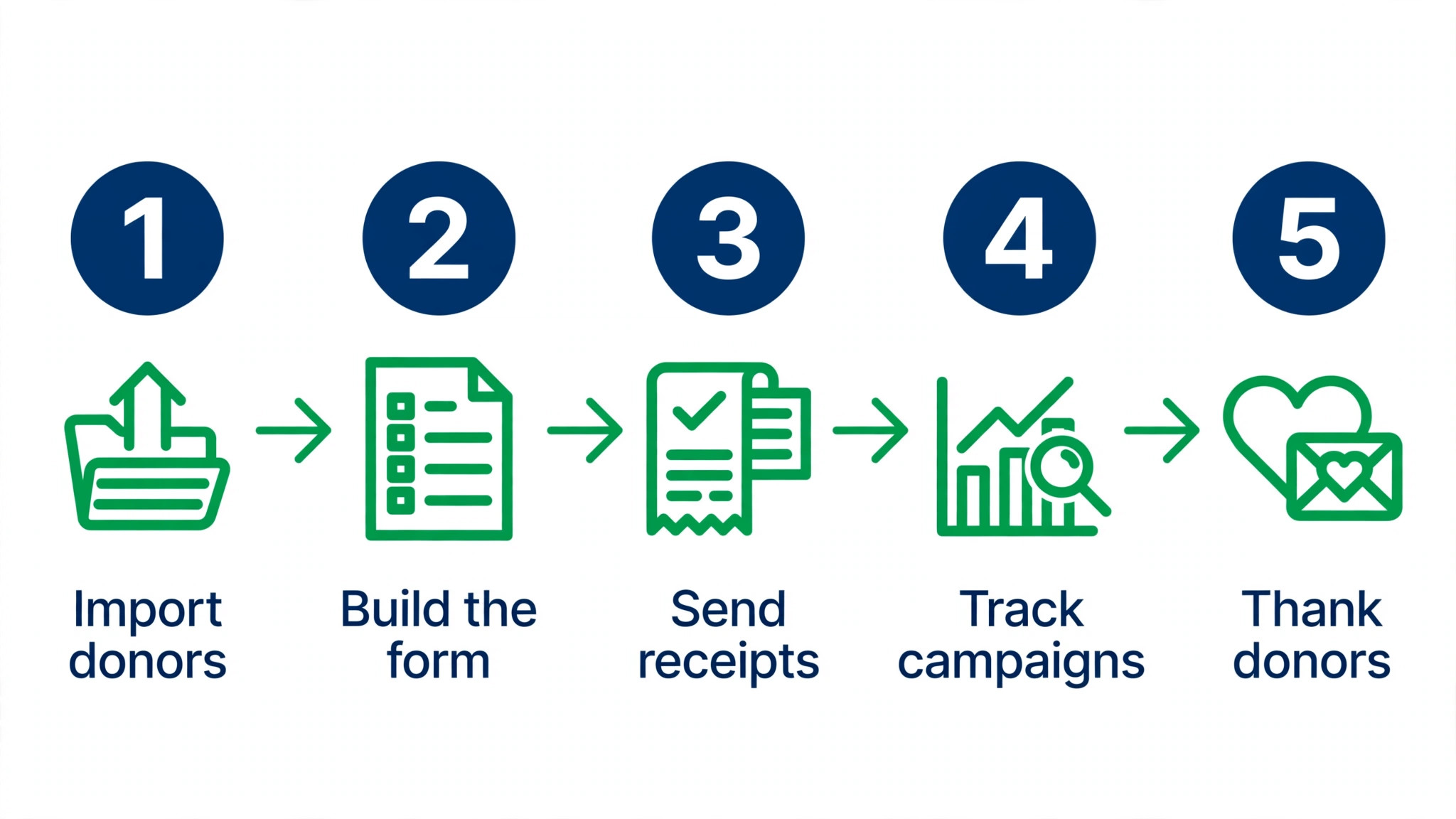
A first campaign does not need a consultant. It needs five small steps, done in order, with a real goal and a real deadline. The steps below show how the best donation management software for small nonprofits fit into a first week of real work for small nonprofits.
- Import donors. Bring in your donor list from a spreadsheet and check that names and gift history match.
- Build the form. Create a donation page with a clear goal, a suggested gift range, and a recurring option.
- Send receipts. Turn on automatic receipts and thank you messages, then test one gift yourself.
- Track campaigns. Watch gifts by campaign each day, and share the running total with the team.
- Thank donors. Send a personal thank you within two days, and note the gift in the donor record.
Frequently Asked Questions
The questions below come from small nonprofits who read the best donation management software for small nonprofits shortlist and wanted the practical answers before choosing.
Is free donation software really free?
Free platforms like Zeffy and Givebutter charge no monthly fee, but the model differs. Zeffy takes no cut of gifts, while Givebutter relies on optional donor tips. Check whether donors can cover fees, and whether the free plan limits records or reports.
Can we move our donor list from spreadsheets?
Yes, every tool on this list imports from a spreadsheet, and most offer help with the first import. Clean the list first by removing duplicates and old addresses, since a messy import creates months of cleanup work later.
Do donors trust these donation pages?
Donors trust pages that look professional, show the nonprofit name clearly, and use a secure payment process. All twelve tools use secure checkout, and the pages carry the nonprofit branding rather than the platform name.
What happens if a recurring gift fails?
The better tools retry the card, notify the donor, and flag the gift for the team. DonorPerfect, Bloomerang, and Neon CRM all handle failed payments with clear alerts, while the simpler form tools send a basic notice and leave the follow up to the team.
Do we still need a separate email tool?
It depends on the platform. Bloomerang, Neon CRM, and Network for Good include email, while Donorbox and Zeffy expect a separate tool. Count the email cost when comparing prices, since a cheap platform plus paid email can cost more than an all in one option.
How long does setup take for a small team?
A simple form takes an hour, and a full donor database takes a week of part time work. The import is the slow part, not the software. Start with the current donor list, import it carefully, and add history later rather than trying to move everything on day one.
Our Pick, Stated Plainly — DonorPerfect Is the Small Nonprofits Default
The best donation management software for small nonprofits has to do the unglamorous work well, which is keeping records clean, sending receipts on time, and showing a team who gave and when. DonorPerfect does that work with the fewest gaps, and its records hold up for years rather than months.
Start with a trial and import a real sample of donor records before paying. If the records look right and the reports make sense to the board, keep it. If the team needs zero fees above all else, Zeffy is the honest second choice, and if the goal is keeping donors, Bloomerang deserves a trial too.