The contest for the best payment tools for ecommerce sellers is really a contest between a checkout that converts and a checkout that costs. Stripe wants to be the payment layer for the whole internet, with a checkout that converts, a dashboard that shows every sale and an API that a developer can shape to any store. PayPal wants to be the wallet every buyer already trusts, with one-click payment for hundreds of millions of accounts and buyer protection that makes a new store feel safe.
The other six tools sit between those two poles, from simple card readers to enterprise gateways, and this guide puts all eight side by side so you can see where the leader wins, where the runner-up catches it, and which tool fits the store you actually run. A checkout that fails costs more than a fee ever will. A buyer who reaches the payment page and finds no wallet, no local method or a form that rejects their card will leave and buy elsewhere, and the sale is lost forever.
A payment tool that offers the methods your buyers use, in the currencies they pay in, will convert more sales than any discount, which is why this guide weighs checkout coverage as heavily as price. We tested each tool against the work a seller actually does, from online card payments and wallets to in-person sales and international orders. We looked at checkout coverage, fee transparency, payout speed and the real cost of the plan a working seller needs.
Prices come from vendor pages and recent pricing guides checked in November 2026, and where a vendor quotes only on request we say so instead of inventing a number.
The 8 Tools at a Glance
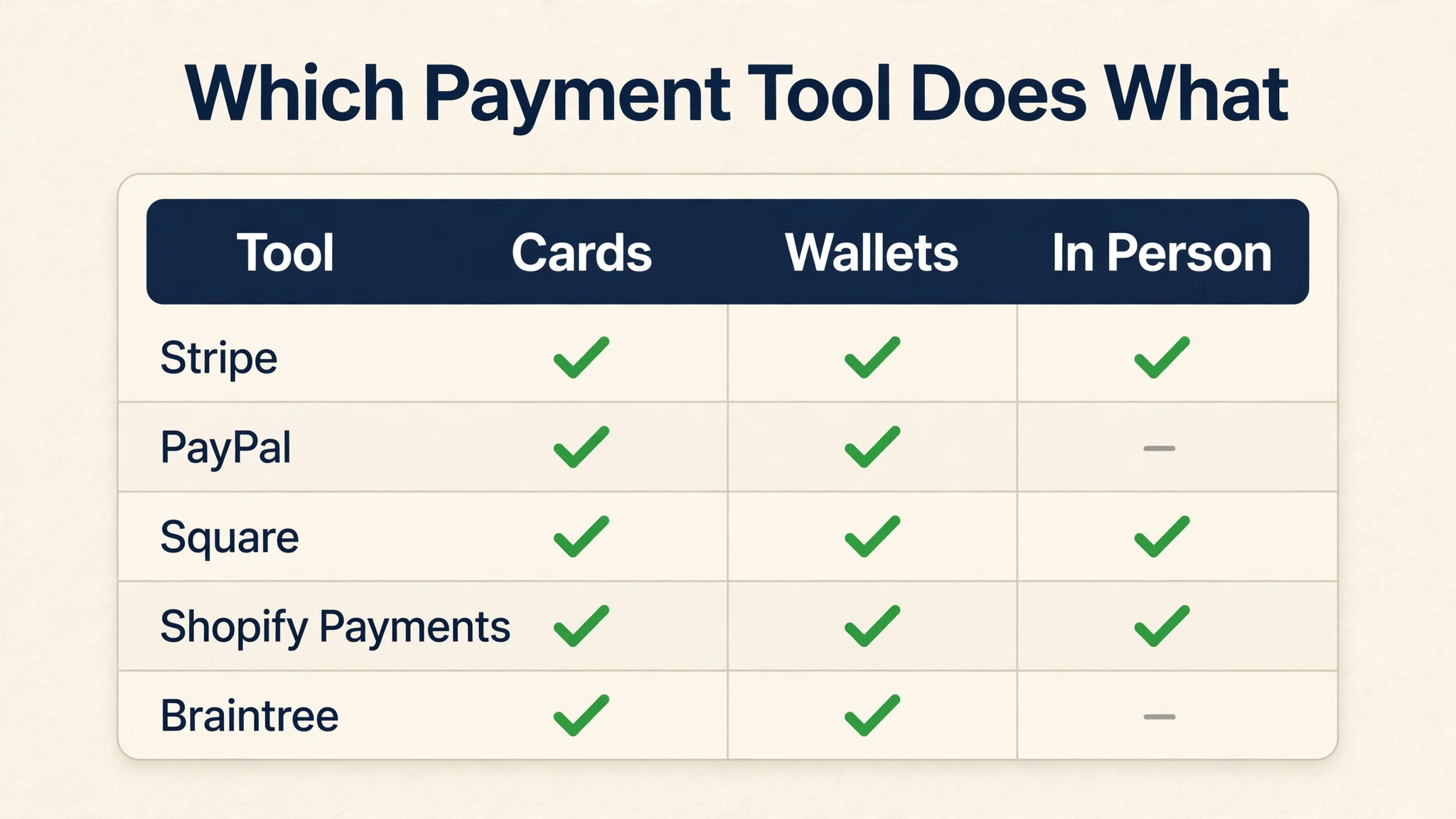
The table below gives the short version of the best payment tools for ecommerce sellers. Stripe leads on checkout coverage, PayPal leads on buyer trust, and the rest specialise by price or channel. Read the detail section before you pay, because the cheapest fee in this list is the wrong choice for a store whose buyers pay with a wallet.
| Tool | Starting price | Best for | Standout strength |
|---|---|---|---|
| Stripe | 2.9% + 30 cents | Online checkout | Best developer tools here |
| PayPal | 2.99% + 49 cents | Buyer trust | Most recognised wallet |
| Square | 2.9% + 30 cents online | In-person sales | Best card reader here |
| Shopify Payments | From 2.9% + 30 cents | Shopify stores | No extra transaction fee |
| Braintree | 2.59% + 49 cents | Low card fees | Lowest card rate here |
| Authorize.net | $25 a month + 2.9% + 30 cents | Gateway for existing accounts | Best for a merchant account |
| Adyen | Pricing on the vendor site | Enterprise global payments | Best global coverage |
| Checkout.com | Pricing on the vendor site | Enterprise online payments | Best for high volume |
Why the Best Payment Tools for Ecommerce Sellers Decide Whether Buyers Finish Checkout
Checkout is where sales are won or lost, and the payment tool decides the outcome. A buyer who finds their wallet, their card and their currency will finish the purchase, while a buyer who finds none of them will leave. The difference between a good checkout and a bad one is measured in conversion rate, and a few points of conversion are worth more than any fee saving. The runner-up matters here because trust is what the buyer feels.
PayPal is the wallet that hundreds of millions of buyers already use, and a new store that offers PayPal will convert better than a new store that offers only cards. Stripe converts better for a known brand, while PayPal converts better for a new one, and the choice comes down to how well buyers already know you. Fees are the third pressure, and they decide whether the sale is profitable. A fee of 2.9 percent plus 30 cents takes a meaningful slice of a small order, and the slice grows on low-value sales.
Braintree charges 2.59 percent, which saves money on every order, while Adyen and Checkout.com charge interchange-plus, which suits a high-volume store. The tools below are ranked on all three pressures together. The last pressure is payout speed, because a seller who waits a week for the money cannot buy more stock. Stripe and Square pay out in two days, while PayPal holds funds for new sellers longer. Check the payout schedule before you commit, because a fast payout is worth more than a low fee when cash flow is tight.

How We Judged Each Payment Tool for a Seller
Every tool in this guide faced the same five tests, and the best payment tools for ecommerce sellers earned their places by passing most of them. We weighted checkout coverage highest, because a buyer who cannot pay will not buy. Fee transparency and payout speed came next, because they decide whether the sale is profitable and whether the money arrives in time. Ease of setup was judged on the plan a working seller needs, with the real cost shown where it applies.
- Checkout coverage, from cards and wallets to local methods and the currencies your buyers pay in
- Fee transparency, meaning the real cost per sale once the monthly fee and the per-transaction charge are counted
- Payout speed, including how fast the money reaches the bank and whether new sellers face holds
- Ease of setup, because a payment tool that takes a week to configure will delay the first sale
- Fraud protection, including the tools that stop chargebacks and the support that helps when one happens
Best Pick by Job
No single tool wins every job, so the table below matches the best payment tools for ecommerce sellers to the work you do most. Start from where your buyers pay, not from the ranking. A store that sells online needs Stripe, a new store that needs trust needs PayPal, and a store that sells in person needs Square.
| If you need | Pick | Why it wins |
|---|---|---|
| Online checkout for a growing store | Stripe | Best checkout, best developer tools, fastest payouts |
| Buyer trust for a new store | PayPal | Most recognised wallet, buyer protection included |
| In-person sales and markets | Square | Best card reader, free point-of-sale app |
| Shopify stores | Shopify Payments | No extra transaction fee, built into the platform |
| Low card fees at volume | Braintree | Lowest card rate in this list |
| Enterprise global sales | Adyen | Best global coverage and local methods |
The 8 Tools in Detail
1. Stripe
The standard rate is 2.9 percent plus 30 cents per successful card charge, with no monthly fee. Stripe is the best online payment tool in this list, with a checkout that converts, a dashboard that shows every sale and an API that a developer can shape to any store. It suits a seller who wants the checkout to work well and the data to be visible, because Stripe shows the revenue, the refunds and the disputes in one place. The payout arrives in two days, and the fraud tools are strong.
Against PayPal, Stripe wins on checkout and developer tools and loses on buyer trust. PayPal is the wallet buyers already use, while Stripe is the checkout that converts best for a known brand. For a growing store with a brand buyers recognise, Stripe is the right leader. For a new store that needs trust, PayPal is the better buy.
Turn on the fraud tools and the radar rules before the first sale, because a chargeback costs more than the fee ever will. Stripe Radar flags the risky payments automatically, and a seller who reviews the flags will stop most fraud before it happens. Check the dispute rate monthly, and tighten the rules if it rises.
Set the payout schedule to match your stock buying, because the money arrives two days after the sale and the stock order should go out the same day. A seller who buys stock on the sale date will run out of cash, while a seller who buys on the payout date will keep the shelves full. Plan the cash flow around the payout, not around the sale.
2. PayPal
The standard rate is 2.99 percent plus 49 cents per online transaction, with no monthly fee. PayPal is the most recognised wallet in this list, with hundreds of millions of accounts and buyer protection that makes a new store feel safe. It suits a seller who needs trust more than anything, because a buyer who sees PayPal will finish the purchase. The checkout is simple, the payout is fast for established sellers, and the buyer protection covers both sides.
Against Stripe, PayPal wins on trust and loses on fees and developer tools. PayPal charges more per sale, and its API is harder to shape than Stripe. For a new store that needs buyers to trust it, PayPal is the right buy. For a growing store with a brand, Stripe is the better choice.
Offer PayPal alongside cards, not instead of them, because the buyers who prefer cards will leave if they cannot pay by card. A checkout that offers Stripe for cards and PayPal for wallets will convert better than either alone, and the extra fee on PayPal sales is worth the conversion. Check the hold policy for new sellers, and plan the cash flow around it.
Check the hold policy for new sellers before you launch, because PayPal holds funds longer for a new account. A new store that plans for the hold will not run out of cash, while a new store that does not will struggle to buy stock. Read the policy, plan the cash flow, and the hold will pass without a problem.
3. Square
The online rate is 2.9 percent plus 30 cents, with no monthly fee for the point-of-sale app. Square is the best in-person payment tool in this list, with a card reader that works anywhere and a free app that turns a phone into a till. It suits a seller who sells at markets, fairs and pop-ups as well as online, because the same account handles both. The inventory syncs between the online store and the physical stall, and the payout arrives in two days.
Against Stripe, Square wins on in-person sales and loses on online depth. Stripe has better developer tools and a stronger online checkout, while Square has the better card reader and the simpler app. For a seller who sells in person, Square is the right buy. For a seller who sells only online, Stripe is the better choice.
Use the free point-of-sale app at every market, because a stall that takes cards will sell more than a stall that takes cash only. A buyer who can tap a card will buy on impulse, while a buyer who has to find cash will walk away. Keep the reader charged, and test it before the market opens.
Keep the reader charged and test it before every market, because a dead reader at a busy stall is a lost day of sales. A spare reader in the bag costs little and saves the day when the first one fails. Test the connection before the market opens, and keep the phone charged too.
4. Shopify Payments
The rate starts from 2.9 percent plus 30 cents on the Basic plan, with no monthly fee beyond the Shopify subscription and no extra transaction fee. Shopify Payments is the best payment tool for a Shopify store, because it is built into the platform and the checkout, the payout and the reporting all work together. It suits a seller who already runs on Shopify, because the setup takes minutes and the fees are transparent. The payout arrives in two days, and the fraud analysis is built in.
Against Stripe, Shopify Payments wins on integration and loses on flexibility. Stripe works on any platform, while Shopify Payments works only on Shopify. For a Shopify store, the built-in tool is the right buy, because it removes the extra transaction fee that third-party gateways charge. For a store on another platform, Stripe is the better choice.
Use the built-in tool and skip the third-party gateway, because the extra transaction fee on a third-party gateway costs money on every sale. A Shopify store that uses Shopify Payments pays only the card rate, while a store that uses another gateway pays the card rate plus the extra fee. The saving adds up to a meaningful sum over a year.
Use the built-in fraud analysis on every order, because a fraudulent order that ships will cost the product and the money. Shopify flags the risky orders automatically, and a seller who reviews the flags will stop most fraud before it ships. Check the risk level on every order, and hold the ones that look wrong.
5. Braintree
The standard rate is 2.59 percent plus 49 cents per transaction, with no monthly fee. Braintree is the cheapest card rate in this list, and it handles cards, PayPal, Venmo and wallets in one integration. It suits a seller who processes enough volume for the lower rate to matter, because the saving on every sale adds up. The tool is owned by PayPal, so the PayPal integration is strong, and the payout is reliable.
Against Stripe, Braintree wins on card fees and loses on developer experience. Stripe has better docs and a stronger dashboard, while Braintree charges less per sale. For a high-volume seller who counts every cent, Braintree is the right buy. For a seller who values the tools around the payment, Stripe is the better choice.
Work out the saving on your actual volume before you switch, because the lower rate only matters at scale. A store that processes $10,000 a month saves $30 a month on the rate difference, while a store that processes $100,000 saves $300. Do the maths on your own numbers, and let the saving decide.
Work out the saving on your actual volume before you switch, because the lower rate only matters at scale. A store that processes $10,000 a month saves $30 a month on the rate difference, while a store that processes $100,000 saves $300. Do the maths on your own numbers, and let the saving decide whether the switch is worth it.
6. Authorize.net
The gateway costs $25 per month plus 2.9 percent plus 30 cents per transaction. Authorize.net is a payment gateway for sellers who already have a merchant account, and it connects the account to the online store with reliable processing and strong fraud tools. It suits a seller with an existing merchant account who wants a stable gateway, because the service is long-standing and the support is solid. The monthly fee is the cost of the gateway, not of the processing.
Against Stripe, Authorize.net wins on merchant account flexibility and loses on simplicity. Stripe needs no merchant account and no monthly fee, while Authorize.net needs both. For a seller who already has a merchant account with a good rate, Authorize.net is a fair buy. For a new seller, Stripe is the better choice.
Compare the total cost against Stripe before you commit, because the $25 monthly fee plus the per-transaction charge may cost more than Stripe flat rate. A seller who processes little volume will pay more on Authorize.net, while a seller with a good merchant account rate may pay less. Do the maths on your own volume, and let the numbers decide.
Compare the total cost against Stripe before you commit, because the $25 monthly fee plus the per-transaction charge may cost more than the flat rate. A seller who processes little volume will pay more on Authorize.net, while a seller with a good merchant account rate may pay less. Do the maths on your own volume, and let the numbers decide.
7. Adyen
Pricing is on the vendor site, and Adyen charges interchange-plus. Adyen is the best global payment tool in this list, with local payment methods in dozens of countries and a single platform for online, in-person and mobile sales. It suits a large seller who sells internationally, because it offers the local methods that buyers in each country expect. The platform is enterprise-grade, and the reporting is deep.
Against Stripe, Adyen wins on global coverage and loses on simplicity. Stripe is easier to set up and cheaper for a small seller, while Adyen covers more countries and more local methods. For a seller who sells in many countries, Adyen is the right buy. For a seller who sells in one or two countries, Stripe is the better choice.
Get the quote in writing with the interchange-plus rates for your main countries, because the headline rate means little without the local costs. A seller who sells in five countries will pay five different rates, and the quote should show each one. Compare the total cost against Stripe, and let the numbers decide.
8. Checkout.com
Pricing is on the vendor site, and Checkout.com quotes per business. Checkout.com is an enterprise online payment platform with strong fraud tools, flexible payouts and a developer-friendly API. It suits a high-volume seller who needs custom payment flows and deep fraud control, because the platform can be shaped to the store. The reporting is strong, and the support is dedicated.
Against Stripe, Checkout.com wins on customisation and loses on simplicity. Stripe is easier to set up and works out of the box, while Checkout.com needs a sales conversation and a custom setup. For a high-volume seller who needs custom flows, Checkout.com is a strong choice. For a seller who wants to start today, Stripe is the better buy.
Get the quote in writing with the rates for your volume, because the price depends on how much you process. A high-volume seller will negotiate a better rate than a small seller, and the quote should reflect that. Compare the total cost against Stripe and Adyen, and let the numbers decide.
A Checkout Setup That Converts From Day One
Start with the best payment tools for ecommerce sellers by offering cards and a wallet, not by offering one or the other. A checkout that offers Stripe for cards and PayPal for wallets will convert better than either alone, because the buyers who prefer cards and the buyers who prefer wallets both find what they want. Connect the payment tool to the store first, test a real purchase with a real card, and check that the payout arrives before you launch. Add one local method a month after that, starting with the method your buyers ask for most.
A store that sells in Germany should add the local methods German buyers expect, while a store that sells in the Netherlands should add the Dutch methods. The local method that matches the buyer will convert better than any discount, and the cost is a single integration. Review the failed payments every week, because a failed payment is a lost sale that the buyer wanted to make. A card that fails on the first try may succeed on the second, and a checkout that retries automatically will recover sales without anyone noticing.
Check the failure reasons, fix the ones you can, and watch the conversion rate rise.
- Offer cards and a wallet from day one, not one or the other
- Test a real purchase with a real card before you launch
- Add one local payment method a month, starting with the most asked for
- Review failed payments weekly and fix the ones you can
- Check the payout schedule and plan cash flow around it
What Payment Tools Actually Cost a Seller Each Month
A seller who processes $10,000 a month will pay around $320 in fees on Stripe or Square, and the maths is simple enough to check. The rate of 2.9 percent plus 30 cents takes $290 in percentage fees and around $30 in per-transaction charges on a hundred orders, and the total is the same on both tools. Braintree charges 2.59 percent, which saves $30 a month at that volume, while PayPal charges more and costs around $350.
The expensive mistake is choosing a tool on the headline rate without counting the monthly fee. Authorize.net charges $25 a month on top of the per-transaction rate, so a small seller who processes little volume will pay more than on Stripe. Work out the total cost on your own volume, including the monthly fee and the per-transaction charge, and let the numbers decide.
| Tool | Monthly cost for one user | What you get for that money |
|---|---|---|
| Stripe | 2.9% + 30 cents | No monthly fee, payout in two days |
| PayPal | 2.99% + 49 cents | No monthly fee, buyer protection |
| Square | 2.9% + 30 cents | No monthly fee, best card reader |
| Shopify Payments | From 2.9% + 30 cents | No extra transaction fee on Shopify |
| Braintree | 2.59% + 49 cents | Lowest card rate in this list |
| Authorize.net | $25 a month + 2.9% + 30 cents | Gateway for an existing merchant account |
Payment Mistakes That Cost Sellers Sales
- Offering only cards, so the buyers who pay with a wallet leave and buy elsewhere
- Choosing a tool on the headline rate without counting the monthly fee and the per-transaction charge
- Skipping the fraud tools, so a chargeback costs more than the fee ever saved
- Forgetting to test a real purchase before launch, so the first buyer finds a broken checkout
Frequently Asked Questions
The questions below come from sellers who are choosing between the best payment tools for ecommerce sellers for the first time. The short answers favour offering cards and a wallet from day one, counting the total cost on your own volume and testing a real purchase before launch.
What is the best payment tool for ecommerce sellers?
Stripe at 2.9 percent plus 30 cents is the best for online checkout and developer tools, while PayPal at 2.99 percent plus 49 cents is the best for buyer trust. A growing store with a brand should buy Stripe, and a new store that needs trust should offer PayPal alongside it. Offer both, and the checkout will convert better than either alone.
How much do payment tools charge per sale?
Most charge 2.9 percent plus 30 cents per sale, while Braintree charges 2.59 percent plus 49 cents and PayPal charges 2.99 percent plus 49 cents. A seller who processes $10,000 a month will pay around $320 in fees on Stripe, and the maths is simple enough to check on your own volume.
Should I offer PayPal as well as cards?
Yes, because the buyers who prefer PayPal will leave if they cannot pay with it. A checkout that offers Stripe for cards and PayPal for wallets will convert better than either alone, and the extra fee on PayPal sales is worth the conversion. Offer both from day one.
Do I need a monthly fee to accept payments online?
No, and Stripe, PayPal, Square and Braintree all charge no monthly fee. Authorize.net charges $25 a month for the gateway, while Adyen and Checkout.com quote per business. A new seller should start with a tool that has no monthly fee, and add a gateway only when the volume justifies it.
How fast will I get paid?
Stripe and Square pay out in two days, while PayPal holds funds longer for new sellers. Check the payout schedule before you commit, because a fast payout is worth more than a low fee when cash flow is tight. Plan the stock buying around the payout schedule, not around the sale date.
What is the best payment tool for in-person sales?
Square is the best for in-person sales, with a card reader that works anywhere and a free app that turns a phone into a till. The online rate is 2.9 percent plus 30 cents, the inventory syncs between the online store and the stall, and the payout arrives in two days.
Our Pick for Ecommerce Sellers, Stated Plainly
Stripe is the pick for a store that sells online and wants the checkout to convert, because its checkout is the best in this list and its developer tools are the strongest. PayPal is the runner-up that most new stores should offer alongside it, because its wallet is the one buyers already trust and its buyer protection makes a new store feel safe. Buy the leader when checkout quality is the job. Buy the runner-up when buyer trust is the job, and offer the two together. Whichever you choose, offer cards and a wallet from day one and test a real purchase before you launch.
The best payment tools for ecommerce sellers will not sell a product by themselves, but a checkout that lets every buyer pay the way they want will convert more sales than any discount.